Okdo Doc to Image Converter Utility
4.36/5 (421 Reviews)
Okdo Doc to Image Converter is an all-in-one doc to image converter.
Business And Productivity
Office Suite
Shareware
FREE DOWNLOAD (v3.6)
File Size: 3.05MB | Official Download
Key Features of Okdo Doc to Image Converter
- Okdo Doc to Image Converter is an all-in-one doc to image converter.
- Own the most powerful conversion function.
- you can batch convert doc format files to image with ease.
- The program can convert with high output quality and very fast speed.
- It can support comprehensive formats: jpeg, jpg, png, emf, wmf, bmp, pcx, jp2, j2k, gif, tiff, rle, tga, ico etc.
- The output image quality is super good with preserving the original text, tables, image, layout of your file.
- Advanced Features: Simultaneously convert massive doc format files to one certain format once to save time.
- Use pagination to output Word original content.
- Convert one multipage word to one multipage tiff.
- Set the output image page size.
- Set color depth as default color,gray,16 color(4 bits),256 color(8 bits),true color(24 bits or 32 bits).
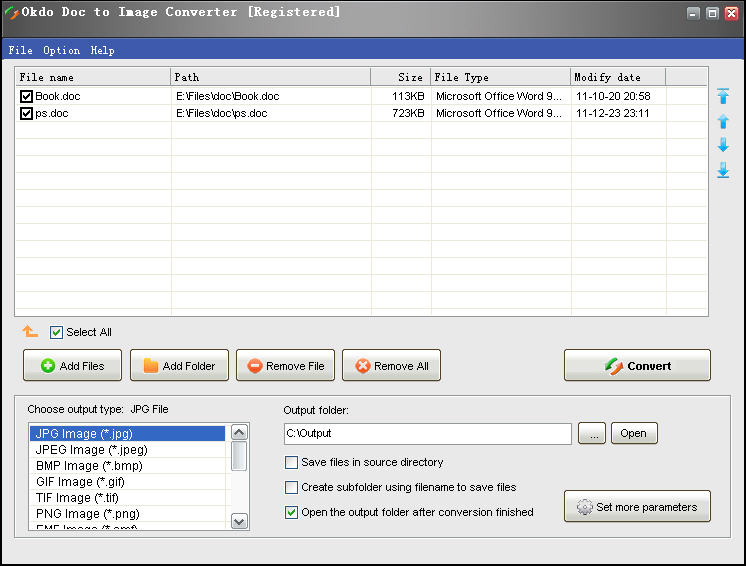
- You can add the whole folder to convert.
- Save List: Save the converted files to a list.
- Load List: Load the saved list files directly to convert.
- You can set to open the output folder when conversion finished.
Technical Specifications
- Publisher: Okdosoft.com
- License: Shareware
- Operating System: Windows 7, Windows 8, Windows 10, Windows 11
- Category: Business And Productivity / Office Suite
Okdo Doc to Image Converter Screenshot