Farbar Recovery Scan Tool Advanced System Diagnostic Utility
Farbar Recovery Scan Tool (FRST) is a portable diagnostic application used to identify and fix complex malware issues on Windows.
**FREE DOWNLOAD (vLatest)**
File Size: 2.33MB | Safe & Verified
Security And Privacy
Anti Malware And Antivirus
Freeware
Key Features of Farbar Recovery Scan Tool
- Farbar Recovery Scan Tool, or FRST, is an advanced, portable diagnostic application designed to run on Windows in normal or safe mode, as well as the Windows Recovery Environment.
- It displays detailed information about Windows Registry loading points, services, drivers, and known DLLs to help users and trained experts identify and remediate deeply rooted malware infections.
- In 2026, it remains the industry standard for manual malware removal and system troubleshooting when automated antivirus solutions fail, offering a reliable, lightweight solution for complex security diagnostics.
How to Use Farbar Recovery Scan Tool (FRST)
Farbar Recovery Scan Tool (FRST) is a portable diagnostic application that provides detailed information about system configurations to help identify and fix malware issues. Follow these steps to generate a system report:
-
Download the Correct VersionDownload either the 32-bit or 64-bit version of FRST to your Desktop. It is essential to run the tool from the desktop for the "Fix" functionality to work correctly later.
-
Launch as AdministratorRight-click the FRST.exe (or FRST64.exe) file and select Run as administrator. When the tool opens, click "Yes" to the disclaimer to proceed to the main interface.
-
Run the Initial ScanEnsure the "Addition.txt" checkbox is selected, then click the Scan button. The tool will begin analyzing your Registry, services, drivers, and system files. This typically takes 1-5 minutes.
-
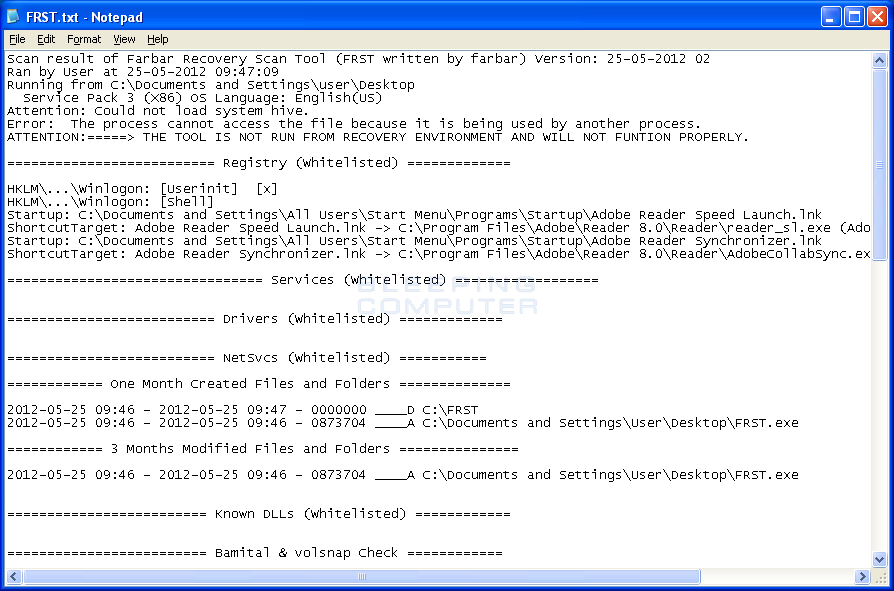
Review Your LogsOnce the scan is complete, two text files (FRST.txt and Addition.txt) will be saved to your desktop. These logs contain technical data used by experts to create a custom "fixlist" to remove specific threats.
Pro Tip: FRST can also be run in the Windows Recovery Environment (WinRE). This is extremely useful for fixing computers that are stuck in a boot loop or cannot load the desktop due to severe malware infection.
Frequently Asked Questions
It is a false positive. Because FRST interacts with deep system components and the Windows Registry, many antivirus programs flag it as a "potentially unwanted program" or generic threat. FRST is a safe, highly-respected tool used globally by malware removal specialists.
The Fix button should only be used if you have a
fixlist.txt file provided by a trained helper. You must place that file in the same folder as the FRST executable and then click Fix. Warning: Attempting to create your own fixlist without expert knowledge can permanently damage your operating system.
No. Unlike standard antivirus software, FRST is a diagnostic tool. It scans and reports what is on your system. Removal only happens when a script is manually applied via the Fix button.
Yes. FRST is regularly updated and fully supports Windows XP through Windows 11. Make sure to download the 64-bit version for modern Windows installations to ensure accurate scanning.
Technical Specifications
- Publisher: Bleepingcomputer.com
- License: Freeware
- Operating System: Windows 7, Windows 8, Windows 10, Windows 11
- Category: Security And Privacy / Anti Malware And Antivirus
Farbar Recovery Scan Tool Screenshot
User Rating
Based on 12 reviews.