ComboFix Advanced Malware Cleaner for Legacy Windows
ComboFix is a powerful, legacy anti-malware tool designed to scan for and automatically remove deeply rooted infections on older Windows systems.
**FREE DOWNLOAD (v19.11.4.1)**
File Size: 5.4MB | Safe & Verified
Security And Privacy
Anti Malware And Antivirus
Freeware
Key Features of ComboFix
- ComboFix is a specialized, aggressive malware removal program created by sUBs that scans your computer for known malware and attempts to clean infections automatically.
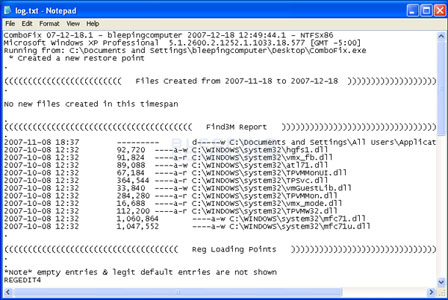
- Originally designed for older operating systems, it provides a detailed log report to assist trained helpers in removing stubborn threats.
- Although its active development ceased, as of 2026, it is still referenced for analyzing legacy systems running Windows XP through 8.
- Due to its powerful nature, it is strictly recommended to run ComboFix only under the supervision of a trained security professional to prevent accidental system damage.
How to Use ComboFix to Remove Advanced Malware
ComboFix is a powerful specialized tool that scans your computer for known malware and deep-rooted infections, attempting to clean them automatically. Follow these steps carefully to ensure a safe and effective scan:
-
Preparation and BackupBefore starting, close all open windows and web browsers. It is highly recommended to disable your existing antivirus software temporarily, as it may interfere with ComboFix's deep-scanning process.
-
Launch ComboFixDownload the ComboFix.exe and save it to your desktop. Double-click the icon to begin. If Windows issues a security warning, click "Run" or "Yes" to grant the tool Administrative privileges.
-
Automated Scanning ProcessComboFix will automatically create a System Restore point and backup your Registry. The tool will then proceed through several "Stages" of scanning. Do not click inside the blue window or use your computer until the process is complete, as this can cause the program to hang.
-
Review the ResultsOnce finished, ComboFix will automatically generate a text log (usually located at
C:\ComboFix.txt). The computer may reboot during this process. Review the log to see which infections were removed or share it with a technical expert for further analysis.
Important Note: ComboFix is a powerful "last-resort" tool. Because it makes significant changes to system files, it should ideally be used under the supervision of a trained malware removal specialist.
Frequently Asked Questions
No. ComboFix is currently designed for Windows XP, Vista, 7, and 8 (32-bit and 64-bit). It is not compatible with Windows 8.1, Windows 10, or Windows 11. Attempting to run it on unsupported versions may result in an error message or system instability.
During the cleaning process, ComboFix may temporarily disconnect your internet to prevent malware from communicating with external servers. Your connection is typically restored automatically once the scan and reboot are finished.
Yes. To clean deep-system infections, ComboFix terminates
Explorer.exe and other system processes. This causes your icons and taskbar to disappear. They will return automatically once the scan is complete.
ComboFix frequently releases updates to keep up with new malware definitions. If you receive an "Expired" message, simply download the latest version from the official BleepingComputer download page to ensure you have the most effective protection.
Technical Specifications
- Publisher: Bleepingcomputer.com
- License: Freeware
- Operating System: Windows 7, Windows 8, Windows 10, Windows 11
- Category: Security And Privacy / Anti Malware And Antivirus
ComboFix Screenshot
User Rating
Based on 26 reviews.