SQL Examiner Suite Utility
4.83/5 (564 Reviews)
SQL Examiner Suite 2010 R2 is a professional solution that covers all your SQL database comparison and synchronization needs.
Development And IT
Databases
Shareware
FREE DOWNLOAD (v4.1.0)
File Size: 11145KB | Official Download
Key Features of SQL Examiner Suite 2010 R2
- SQL Examiner Suite 2010 R2 compares and synchronizes both schema and data of SQL Server including the new SQL Server 2008.
- You can compare any version of SQL Server form 7.0 to 2008.
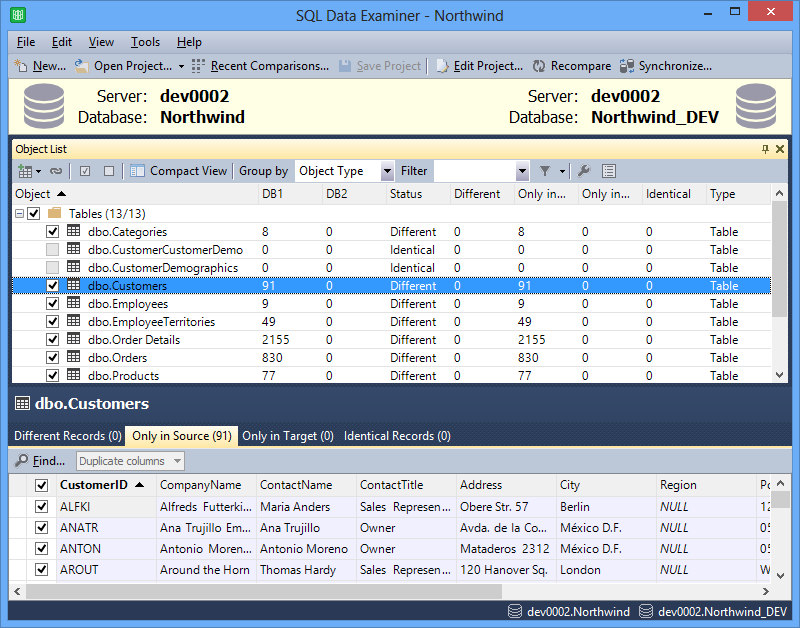
- SQL Data Examiner allows you to compare and synchronize not only SQL Server but also Oracle, SQL Azure, MySQL and Access databases.
- Comparison with backups and SQL scripts, compare results of SQL queries, etc.
How to compare and deploy databases using SQL Examiner Suite
SQL Examiner Suite solves the ultimate deployment headache for Database Administrators: safely migrating both database structures (schemas) and their underlying records (data) from development to production without downtime or manual scripting errors. Follow these steps to execute a flawless database sync:
-
Set Up Your Database ConnectionsLaunch the Suite and choose whether you want to start with a Schema or Data comparison. Enter your credentials for the Source (your development or master database) and the Target (the destination you want to update).
-
Compare the Schema (Structure)Always run the schema comparison first. The tool will scan your tables, views, stored procedures, and triggers, providing a color-coded visual report highlighting exactly which objects have been added, modified, or dropped between the two databases.
-
Compare the Data (Records)Once your database structures are aligned, switch to the Data comparison module. Map your tables and execute the scan to identify missing, orphaned, or out-of-sync rows across your environments.
-
Review and Deploy SQL ScriptsSelect the specific schema objects and data rows you want to migrate. Click Synchronize, and the software will automatically generate and safely execute the exact
ALTER,INSERT,UPDATE, andDELETEscripts needed to mirror your source.
Pro Tip: Need to integrate database deployments into your CI/CD pipeline? The Suite includes a robust command-line utility, allowing you to completely automate nightly schema checks and data synchronizations!
Frequently Asked Questions
SQL Data Examiner only compares and synchronizes the records inside your tables. SQL Examiner Suite is the complete package; it combines SQL Data Examiner with the core SQL Examiner tool, allowing you to synchronize both the database structure (schema) and the data contents.
Yes. Cross-platform database migration is a core feature. The Suite can automatically map compatible data types across different platforms, allowing you to seamlessly move schema and data between SQL Server, Oracle, MySQL, and PostgreSQL.
Yes. You don't need two live servers to perform a comparison. You can use a SQL database backup, a detached database file, a SQL script, or a source control repository (like SVN, TFS, or Git) as either your source or target for synchronization.
Dependency errors usually occur if you are trying to sync data into a table that relies on Foreign Keys from a parent table that hasn't been updated yet, or if your Target schema is out of date. To fix this, always ensure you have run a full Schema Synchronization before attempting to sync the data. Additionally, verify that your database user has the necessary
ALTER and UPDATE permissions on the target server.
Technical Specifications
- Publisher: Sqlaccessories.com
- License: Shareware
- Operating System: Windows 7, Windows 8, Windows 10, Windows 11
- Category: Development And IT / Databases
SQL Examiner Suite 2010 R2 Screenshot