Okdo PowerPoint to HTML Converter Utility
4.93/5 (139 Reviews)
Okdo PowerPoint to Html Converter is the easiest and fastest way to batch convert your ppt/pptx/pptm format file to Html file.
Business And Productivity
Office Suite
Shareware
FREE DOWNLOAD (v3.6)
File Size: 3.05MB | Official Download
Key Features of Okdo PowerPoint to Html Converter
- Okdo PowerPoint to Html Converter is the easiest and fastest way to batch convert your ppt/pptx/pptm format file to Html file.
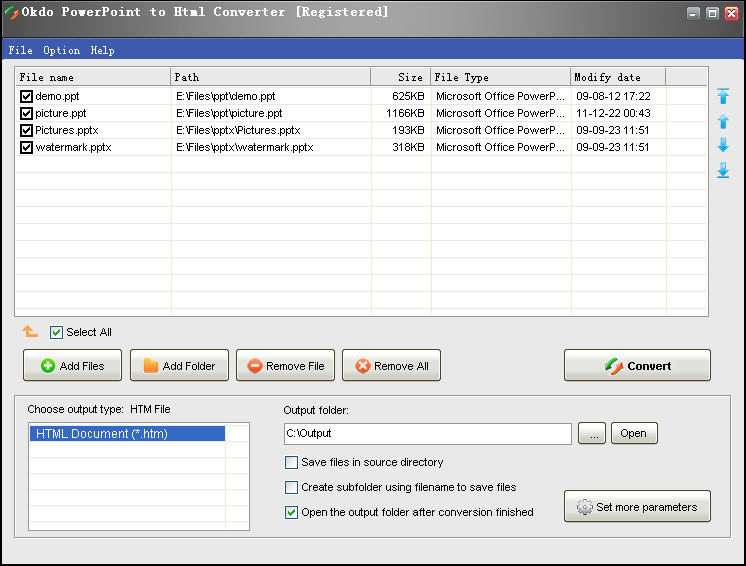
- All you need to do is to add your converted files to the list then click "Convert" is ok.
- The speed is super fast, the quality is super good.
- It has many advantages for you to use.
- It can preserve original layout, text, images etc of your file.
- Advanced Features: Simultaneously convert massive ppt/pptx/pptm format files to Htm once with ease.
- Support merge multi-page ppt/pptx/pptm slides to one HTM by default mode.
- Support merge multi-page ppt/pptx/pptm slides to one HTM by extract the character mode.
- Support merge multi-page ppt/pptx/pptm slides to one HTM by image mode.
- You can add the whole folder to convert.
- Save List: Save the converted files to a list.
- Load List: Load the saved list files directly to convert.
- You can set to open the output folder when conversion finished.
Technical Specifications
- Publisher: Okdosoft.com
- License: Shareware
- Operating System: Windows 7, Windows 8, Windows 10, Windows 11
- Category: Business And Productivity / Office Suite
Okdo PowerPoint to Html Converter Screenshot