Any DWG to JPG Conversion Utility
3.63/5 (406 Reviews)
DWG to JPG Converter is a batch converter that allows you to convert DWG and DXF files to TIF (TIFF), JPG (JPEG), BMP, GIF, PNG, TGA, PCX, WMF and EMF without the need of AutoCAD.
Multimedia And Design
Image And Graphic Design
Shareware
FREE DOWNLOAD (v2024)
File Size: 4998KB | Official Download
Key Features of DWG to JPG Converter 7.1.12
- Any DWG to JPG Converter is a specialized batch conversion utility designed to bridge the gap between complex Computer-Aided Design (CAD) environments and universal image viewing formats.
- In professional architectural and engineering workflows, sharing native drawing files (DWG or DXF) can be problematic due to the requirement for expensive, specialized software to view them.
- This utility resolves that friction by rendering CAD drawings into standard JPEG image files, which can be easily emailed, archived, or embedded into documents without requiring the recipient to possess AutoCAD or similar design suites.
- The software is a standalone application, meaning it does not rely on an existing installation of AutoCAD to function, making it a cost-effective solution for administrative staff, project managers, or clients who need to review visuals without altering the source geometry.
- The core strength of the application lies in its versatility regarding input versions and output customization.
- It supports a vast range of DWG and DXF versions, typically ranging from the ancient R2.5 standards up to the modern AutoCAD 2023/2024 file formats.
- This backward and forward compatibility ensures that legacy archives and current project files are processed with equal reliability.
- Users have granular control over the rasterization process.
- The converter allows for the customization of image size, resolution, and color depth, ensuring that the output is legible for technical review or compressed sufficiently for web transmission.
- Crucially, it supports the conversion of both "Model Space" (the infinite 3D or 2D workspace where design happens) and "Paper Space" (the layout views prepared for printing), allowing users to extract the exact visual representation they require.
- For high-volume workflows, Any DWG to JPG Converter includes a robust batch processing engine.
- Users can load entire directory trees or drag-and-drop massive lists of drawing files to be processed in a single queue.
- This automation is essential for firms creating digital archives of physical blueprints or standardizing project documentation.
- The software also provides options for handling external references (Xrefs) and line weights, attempting to preserve the visual fidelity of the technical drawing as it transitions to a raster format.
- By converting vector data to pixel-based data, it also serves as a security layer, preventing third parties from editing the precise geometry of the original engineering files while still allowing them to view the design intent.
Technical Specifications
- Publisher: Anydwg.com
- License: Shareware
- Operating System: Windows 7, Windows 8, Windows 10, Windows 11
- Category: Multimedia And Design / Image And Graphic Design
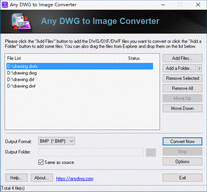
DWG to JPG Converter 7.1.12 Screenshot