Free Timer Professional Desktop Countdown Clock App
4.67/5 (14 Reviews)
Free Timer is a lightweight and full featured application that allows you to create visual countdowns.
System Utilities
System Optimization
Freeware
FREE DOWNLOAD (v5.3)
File Size: 4.4MB | Official Download
Key Features of Free Timer
- Free Timer is a premier desktop utility designed for high performance time management and visual countdown tracking.
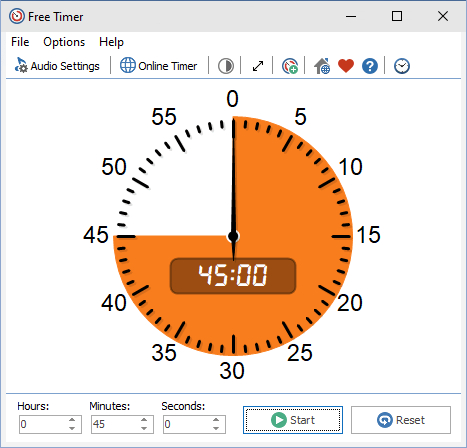
- It provides users with an intuitive clock face interface where the remaining time is displayed as a brightly colored section that steadily decreases.
- The software features full screen capabilities making it perfect for classrooms, auditoriums, and professional presentations where high visibility is paramount.
- In 2026, it remains a vital tool for educators and productivity enthusiasts needing a safe and verified environment to manage strict schedules without distraction.
- Its support for running multiple simultaneous instances and custom music alerts ensures absolute precision for various tasks.
- Free Timer is the globally trusted choice for lightweight and reliable timekeeping across all modern Windows desktop platforms.
How to Manage Time Effectively with Free Timer
Free Timer is a lightweight, visual desktop application for Windows that helps you track time effortlessly. Whether you are presenting, studying, or cooking, follow these steps to set up your first countdown:
-
Set Your Time IntervalOpen the Free Timer application. Use the simple input fields to set your exact countdown duration by specifying the hours, minutes, and seconds required for your task.
-
Choose Your Alarm MusicSelect the notification sound you want to hear when the time is up. You can choose from the built-in alerts (like a metronome) or browse your PC to select your own MP3 music files.
-
Customize the Visual DisplayThe remaining time is displayed as a highly visible colored section on a clock face. You can change the color of this section or switch the background to black to make it easier to see from across the room.
-
Start the CountdownClick Start. The colored pie slice will shrink counter-clockwise as time passes. When it hits zero, your music will play automatically.
Pro Tip: You can run multiple instances of Free Timer at the exact same time! Just open the app again and assign a different color to the new clock face so you can easily track different tasks at a glance.
Frequently Asked Questions
Yes! Free Timer includes a built-in feature designed to wake up your Windows system from Sleep mode. When your countdown finishes, it will wake the PC and play your alert sound so you never miss a deadline.
Don't worry about missing your alarm. If the system sound is muted, Free Timer is programmed to automatically force the Windows volume up when the notification triggers. You can even pre-set a comfortable volume level within the app's settings.
Absolutely. You can open several instances of the Free Timer program simultaneously. This is especially helpful for teachers, presenters, or cooks who need to track multiple distinct events at once. We recommend color-coding each timer to tell them apart easily.
Currently, Free Timer is a lightweight desktop application built specifically for the Windows operating system. It does not have native versions for macOS, iOS, or Android.
Technical Specifications
- Publisher: Free-timer.com
- License: Freeware
- Operating System: Windows 7, Windows 8, Windows 10, Windows 11
- Category: System Utilities / System Optimization
Free Timer Screenshot