Virtual Serial Port Driver
4.20/5 (27 Reviews)
Virtual Serial Port Driver creates virtual COM ports and connects them via a virtual null modem cable.
System Utilities
System Optimization
Trialware
FREE DOWNLOAD (v11.0.1068)
File Size: 6.5MB | Official Download
Key Features of Virtual Serial Port Driver
- Virtual Serial Port Driver is a premier system utility designed for high performance serial port emulation and advanced hardware testing.
- It provides developers and IT professionals with a robust framework for creating an unlimited number of virtual COM port pairs connected via a virtual null modem cable.
- The software ensures that any data sent to one port is momentarily received by the other without requiring physical cables or occupying real interfaces.
- In 2026, it remains a vital tool for engineers needing a safe and verified environment for testing debugging and developing serial communication applications.
- Its complete emulation of hardware control lines and customizable baud rates guarantees absolute precision for complex data routing scenarios.
- Virtual Serial Port Driver is the globally trusted choice for seamless COM port management across all modern Windows desktop and server environments.
How to Create and Connect Virtual COM Ports
Virtual Serial Port Driver allows you to create pairs of virtual COM ports linked by a virtual null-modem cable. These ports function exactly like physical hardware, allowing your serial applications to communicate seamlessly.
-
Launch the Software as AdminDownload and install the application. Because it creates virtual hardware devices on your system, right-click the shortcut and select Run as Administrator to ensure you have the correct permissions.
-
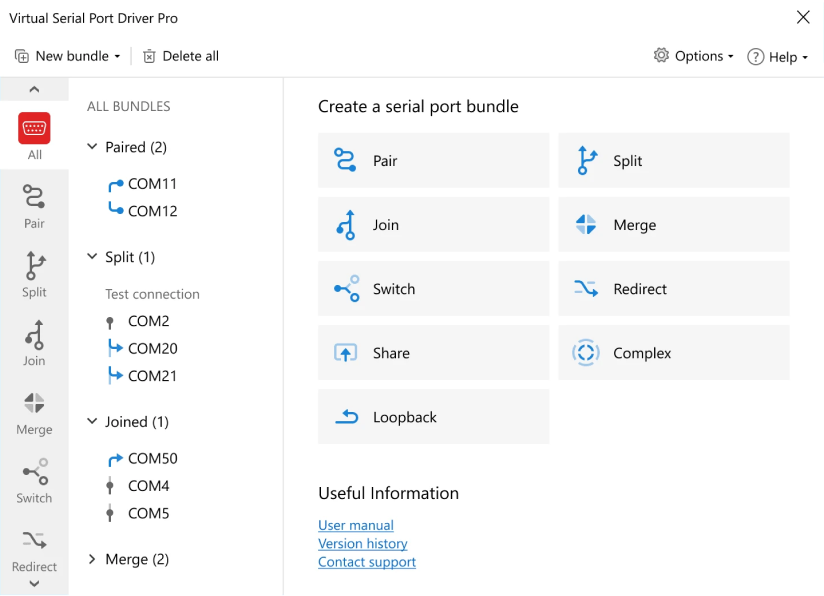
Select Your COM Port PairNavigate to the Pair tab. Use the dropdown menus to select two unused COM port numbers (e.g., COM3 and COM4). The software will automatically filter out port numbers already in use by your physical hardware.
-
Create the ConnectionClick the Add pair button. In seconds, the new virtual ports will be created and bridged together. You can verify their creation by checking your Windows Device Manager under the "Ports (COM & LPT)" section.
-
Connect Your ApplicationsOpen your serial software applications. Connect Application A to the first port (e.g., COM3) and Application B to the second port (e.g., COM4). Any data sent to COM3 will instantly be received by COM4, and vice versa.
Pro Tip: Need to test specific hardware conditions? Go to the Custom pinout settings to manually wire your virtual signal lines (DTR/DSR, RTS/CTS, etc.) or enable "Strict baudrate emulation" for precise speed testing.
Frequently Asked Questions
Yes. The virtual COM ports created by this software act exactly like real hardware ports. They are recognized by Windows Device Manager and all standard Windows APIs, meaning your serial applications will interact with them as if a physical RS232 cable were plugged into your PC.
This typically happens for two reasons: either you are not running the software with Administrator privileges (which are required to create virtual devices in Windows), or you are trying to create a virtual COM port using a number (e.g., COM1) that is already assigned to a physical device on your motherboard.
No. There are no hard limits built into the software. You can create hundreds of virtual COM port pairs simultaneously. The only limitation is the amount of CPU and system resources available on your machine.
Absolutely. The PRO version of Virtual Serial Port Driver allows you to configure custom pinouts. You can choose from standard presets (like loopback) or manually configure the signal lines (TXD, RXD, RTS, CTS, DTR, DSR, DCD, RI) to perfectly match the wiring schematic of your physical hardware.
Technical Specifications
- Publisher: Virtual-serial-port.org
- License: Trialware
- Operating System: Windows 7, Windows 8, Windows 10, Windows 11
- Category: System Utilities / System Optimization
Virtual Serial Port Driver Screenshot