Upscayl - Lightweight Image Environment
4.78/5 (21 Reviews)
Upscayl lets you upscale and enlarge low resolution images using advanced AI algorithms.
Multimedia And Design
Image And Graphic Design
Open Source
FREE DOWNLOAD (v2.11)
File Size: 312.0MB | Official Download
Key Features of Upscayl
- Upscayl is a premier open source utility designed for high performance image upscaling and advanced AI visual management.
- It provides users with a remarkably robust environment to enlarge photos without losing quality using state of the art neural networks with absolute precision.
- The software features an integrated sharpening engine that handles multiple AI models allowing for seamless restoration of low resolution assets.
- In 2026 it remains a vital tool for designers needing a safe and verified environment for batch processing high fidelity graphics across diverse hardware configurations.
- Its support for local processing and a highly intuitive interface ensures that every enhancement task is handled with incredible speed and professional grade accuracy.
- Upscayl is the globally trusted choice for powerful and reliable image enlargement across all modern desktop platforms.
How to enhance and enlarge blurry photos using AI
Upscayl is a free, open-source desktop application that solves a massive problem: turning low-resolution, pixelated images into high-quality, sharp photos. By using advanced AI models locally on your machine, it saves you from paying expensive subscriptions for web-based enhancers. Follow these steps to upscale your images:
-
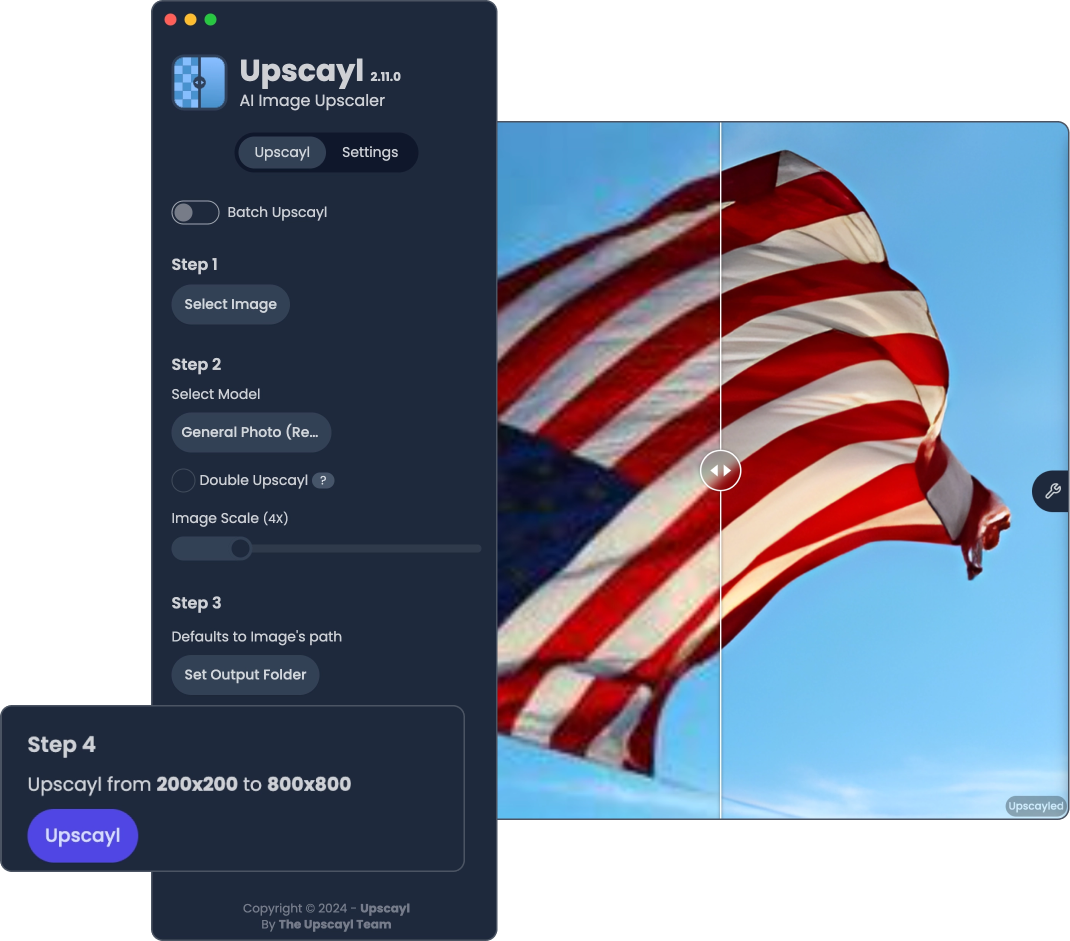
Import Your ImageOpen the Upscayl application and click Select Image (or simply drag and drop your file into the window). If you have multiple images to process, toggle the Batch Upscayl switch to upload an entire folder.
-
Choose an AI ModelSelect the upscaling model that best fits your image type. For standard pictures, use General Photo (Real-ESRGAN or Remacri). If you are enhancing 2D drawings, select the Digital Art or Anime-specific models to prevent weird, unwanted textures.
-
Set the Output FolderClick Set Output Folder to choose exactly where the newly enhanced, high-resolution image will be saved on your computer.
-
Click UpscaylHit the Upscayl button! The software will utilize your computer's graphics card to generate the new pixels. Once finished, a side-by-side slider will appear so you can easily compare the blurry original to the sharp result.
Pro Tip: Need an image to be massive for a poster print? Check the Double Upscayl box in step 2. This will run the AI process twice, enlarging your original image by up to 16x its original size!
Frequently Asked Questions
Yes. Because the desktop version of Upscayl runs AI processing locally on your machine, it requires a Vulkan-compatible GPU to work efficiently. If you are running it on an older machine with only a basic CPU, the process will either fail or take a very long time. For older machines, you can opt for their paid Upscayl Cloud service.
AI upscaling works by "guessing" missing pixels based on its training data. Sometimes, an AI model will over-sharpen an image or hallucinate details that shouldn't be there, especially on small faces or highly compressed, noisy backgrounds. To fix this, try processing the image again using a different model from the dropdown list (like switching from Real-ESRGAN to Remacri or Ultramix Balanced).
Yes, the desktop application is completely free and open-source. You can download it for Windows, Mac, or Linux and use it forever without paying a dime. They do offer an optional, premium subscription called "Upscayl Cloud" which processes images on their high-speed servers, bypassing the need for you to own an expensive graphics card.
Yes. Advanced users can easily add custom models to the software. You simply need to create a folder on your computer, place your custom NCNN models (in
.bin and .param format) inside, and then link that folder to Upscayl via the Settings tab.
Technical Specifications
- Publisher: Upscayl.org
- License: Open Source
- Operating System: Windows 7, Windows 8, Windows 10, Windows 11
- Category: Multimedia And Design / Image And Graphic Design
Upscayl Screenshot