PowerClick Utility
4.70/5 (53 Reviews)
PowerClick is small utility that provide you with fast access to, all commonly used, power managment features available in Windows.
System Utilities
System Optimization
Freeware
FREE DOWNLOAD (v1.0)
File Size: 0.02MB | Official Download
Key Features of PowerClick
- PowerClick is small utility that provide you with fast access to, all commonly used, power managment features available in Windows.
- Those are shutdown, restart, standby, hibernate, log off and station lock.
- Some people (like the author it self) sometimes hate to bother, to shutdown or restart system the regular way.This is usually the case when large number of applications are running but only the quick shutdown or restart is needed.
- Windows will refuse to close is some programs are running, so you would have to close every application, one at the time, which can be quite annoying.
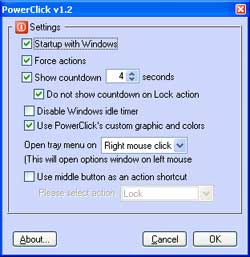
- With PowerClick you can force all programs to close before shutdown or restart, which is sometimes quite usefull.
- You don\'t have to wait until all programs are closed, you can invoke shutdown and leave the desk with assurance that system will be properly turned off.
- Similiar programs exists, but some of them are as big as one megabyte or even more, which is absolutely unnceessary overhead for such an simple application!
- Lets keep it small and simple.
- Just click it and leave it!
Technical Specifications
- Publisher: Asmdev.net
- License: Freeware
- Operating System: Windows 7, Windows 8, Windows 10, Windows 11
- Category: System Utilities / System Optimization
PowerClick Screenshot