Okdo Pdf to Image Converter Utility
4.94/5 (540 Reviews)
Okdo Pdf to Image Converter is the easiest and most advanced pdf to image converter.
Business And Productivity
Office Suite
Shareware
FREE DOWNLOAD (v3.5)
File Size: 7.07MB | Official Download
Key Features of Okdo Pdf to Image Converter
- Okdo Pdf to Image Converter is the easiest and most advanced pdf to image converter.
- Convert PDF to image in batches with ease.
- With it, you can batch convert your PDF file to jpg,jpeg,bmp,gif,tiff,png,wmf,emf,ico,jp2,j2k,rle,tga,pcx format.
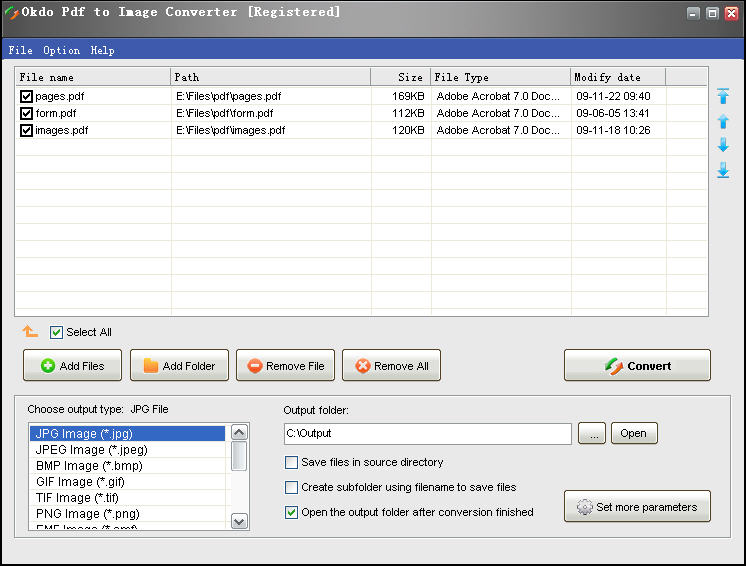
- User-friendly interface is very easy to use with merely a few clicks.
- No other software like it has so powerful and massive functions.
- It can preserve original layout,images, text, vector drawings of your pdf file.
- The output quality is super good and the speed is super fast.
- You will like it when you use it.
- Advanced Functions: It is a standalone program which does not need Adobe Acrobat software support.
- Simultaneously convert massive PDF format files to one certain image format file once to save your time.
- Convert PDF to image with accurately preserving the original Text, Tables, Graphics & Layout.
- Batch Convert PDF to jpeg, jpg, bmp, gif, tif, png, emf, wmf, ico, jp2, j2k, pcx, rle, tga etc.
- Separately convert each page of PDF to one image.
- Use AdobeReader to convert PDF to Image.
- Convert all pages of PDF to one image.
- Convert one multipage PDF to one multipage tiff, gif.
- Custom to set the output image size.
- Set color depth as default color,gray,16 color(4 bits),256 color(8 bits),true color(24 bits or 32 bits).
- Provide more detailed parameters settings to resize the output file.
- Adjust the JPG, JPEG quality from 1-100.
- Custom to set the output file name.
- You can add the whole folder to convert.
- Save List: Save the converted files to a list.
- Load List: Load the saved list files directly to convert.
- You can set to open the output folder when conversion finished.
Technical Specifications
- Publisher: Okdosoft.com
- License: Shareware
- Operating System: Windows 7, Windows 8, Windows 10, Windows 11
- Category: Business And Productivity / Office Suite
Okdo Pdf to Image Converter Screenshot