LosslessCut - Premier Video Application Tool
4.48/5 (23 Reviews)
LosslessCut is the ultimate tool for extremely fast and lossless video and audio trimming.
Multimedia And Design
Video And DVD
Open Source
FREE DOWNLOAD (v3.59)
File Size: 102.5MB | Official Download
Key Features of LosslessCut
- LosslessCut is a premier open source utility designed for high performance video trimming and advanced media management.
- It provides users with a remarkably robust environment to cut and join video segments without re encoding with absolute precision and zero quality loss.
- The software features an integrated FFmpeg based engine that handles instant splicing of MP4 MOV and MKV files allowing for seamless editing of massive raw footage.
- In 2026 it remains a vital tool for videographers needing a safe and verified environment for rapid scene selection across diverse hardware configurations.
- Its support for metadata preservation and a highly responsive timeline ensures that every cutting task is handled with incredible speed and professional grade accuracy.
- LosslessCut is the globally trusted choice for powerful and reliable lossless editing across all modern desktop platforms.
How to trim videos instantly without losing quality
LosslessCut is the Swiss Army Knife of lossless video and audio editing. It solves the frustrating problem of waiting hours for a standard video editor to re-encode a massive file just to cut out a few seconds of footage. By copying the data stream directly, it shaves gigabytes off your files in seconds. Follow these steps to start trimming:
-
Import Your Media FileOpen the LosslessCut application and drag and drop your heavy video or audio file (like an MP4, MKV, or MOV) directly into the main window to load it into the timeline.
-
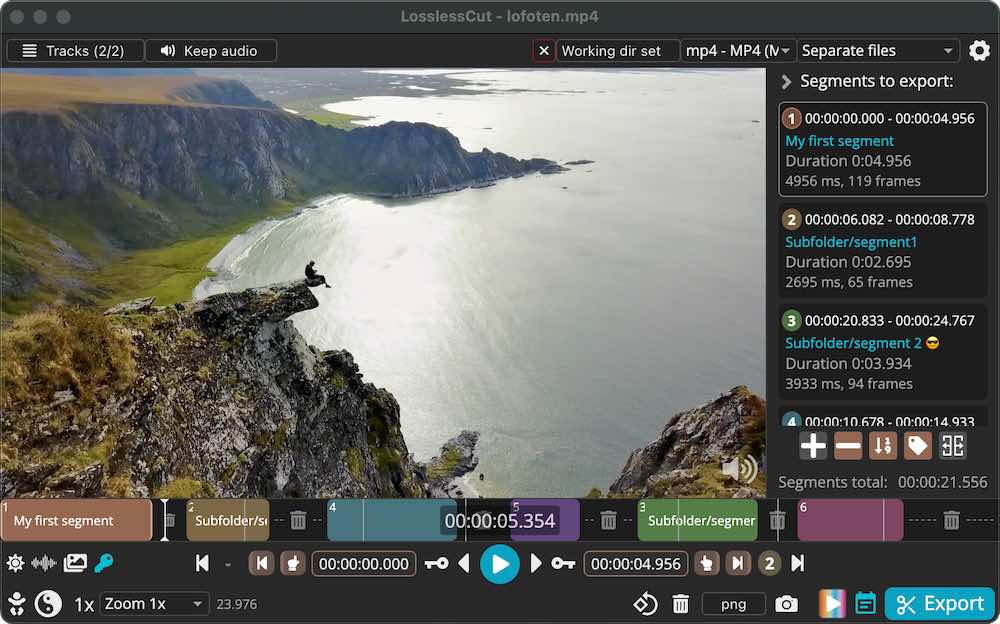
Set Your Start and End PointsUse the playback controls or scrub through the timeline to find the part you want to keep. Click the < icon (or press 'I' on your keyboard) to set the start point of your cut, and the > icon (or press 'O') to set the end point. You can create multiple cut segments from a single file.
-
Manage Tracks (Optional)If your video has multiple audio tracks or subtitles, click the Tracks button. You can easily uncheck an audio track to strip the sound, or extract a specific subtitle track seamlessly.
-
Export in SecondsClick the Export button. Because LosslessCut doesn't re-encode the video, your new trimmed file will be saved to your hard drive almost instantaneously, maintaining 100% of the original quality.
Pro Tip: Need to combine several clips from a GoPro or smartphone? You can use the "Merge" feature to concatenate multiple videos of the exact same resolution and codec into one large file instantly!
Frequently Asked Questions
LosslessCut is incredibly fast because it does not re-encode the video. However, this means it is not meant for exact, frame-by-frame cutting. The software must round your cut time to the nearest previous "keyframe." Depending on how your video was originally encoded, this keyframe might be a fraction of a second or up to several seconds before your desired cut point.
The free version downloaded directly from GitHub is an unsigned executable file. Windows SmartScreen and some antivirus programs will flag it simply because it lacks an expensive digital certificate. It is perfectly safe. If you want to bypass these warnings and receive automatic updates, you can purchase the signed version from the Microsoft Store or Mac App Store to support the developer.
Yes! This is a process called "remuxing." LosslessCut allows you to quickly change container formats (like MKV, MOV, or TS) to an MP4 for easier playback on devices like iPhones or TVs, all without losing quality or waiting for a long rendering process.
No. LosslessCut reduces file size solely by cutting out the unwanted parts of the video stream. It does not use compression algorithms to shrink the visual quality of the remaining footage. If you need to shrink a whole video via compression, you will need to use a dedicated transcoder tool like HandBrake.
Technical Specifications
- Publisher: Losslesscut.app
- License: Open Source
- Operating System: Windows 7, Windows 8, Windows 10, Windows 11
- Category: Multimedia And Design / Video And DVD
LosslessCut Screenshot