KeePass Professional Secure Local Password Vault App
KeePass is a free open source password manager which helps you to manage your passwords in a secure way.
**FREE DOWNLOAD (v2.60)**
File Size: 4.4MB | Safe & Verified
Security And Privacy
Encryption And Passwords
Open Source
Key Features of KeePass Password Safe
- KeePass Password Safe is a premier open source utility designed for high performance credential management and local data security.
- It allows users to store all passwords in a single highly encrypted database that is locked with one master key or a physical key file.
- The software utilizes industry leading encryption standards including AES 256 and ChaCha20 to protect usernames, passwords, and sensitive notes from unauthorized access.
- In 2026, it remains a vital tool for privacy conscious individuals needing a safe and verified environment for offline password storage.
- Its robust plugin architecture and auto type functionality provide professional grade efficiency for managing complex login requirements across various applications and websites globally.
How to securely store and manage your passwords with KeePass
KeePass is a free, open-source password manager that keeps your credentials locked in a highly encrypted, offline database. Follow these steps to create your secure digital vault:
-
Create Your Secure DatabaseDownload and install KeePass. Open the application and click File > New. Choose a safe location on your computer to save your new password database file (it will have a .kdbx extension).
-
Set a Strong Master KeyYou will be prompted to create a Master Password. This is the only password you will ever need to remember, so make it strong and unique! For extra security, you can also select the option to require a separate "Key File" alongside your password.
-
Add Your Account EntriesOnce inside your vault, click the Add Entry key icon. Give the entry a Title (e.g., "My Bank"), enter your Username, and type your password. You can also use the built-in Password Generator to create a highly complex, unguessable password.
-
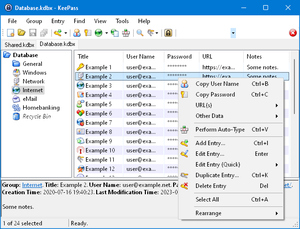
Log In Using Auto-TypeWhen you need to log into a website, simply open that webpage, click on the username field, switch to KeePass, right-click your saved entry, and select Perform Auto-Type. KeePass will automatically type your username and password for you!
Pro Tip: Because KeePass stores everything locally, you are entirely responsible for your data! Always make regular backups of your .kdbx database file to a separate USB drive or an encrypted cloud folder in case your hard drive fails.
Frequently Asked Questions
Your data will be permanently locked. Because KeePass prioritizes absolute security, there is no "forgot password" button, no backdoor, and no customer support team that can unlock it for you. It is highly recommended to write your Master Password down on a piece of paper and store it in a physical safe.
No, and that is by design. Unlike many commercial password managers that sync your data to their own servers, KeePass is completely offline. Your encrypted database file (.kdbx) lives only on your local hard drive, giving you 100% control over your sensitive information and protecting you from remote server data breaches.
Yes. The standard KeePass 2.x software is built for Windows and requires the Microsoft .NET Framework to be installed on your computer. Fortunately, this framework is already pre-installed on virtually all modern Windows operating systems.
Yes, via unofficial ports. While the official KeePass software is designed for Windows, the open-source community has created fantastic, fully compatible versions for other platforms. You can use KeePassXC on Mac and Linux, KeePassDX for Android, or Strongbox for iOS to open and manage your KeePass databases on the go.
Technical Specifications
- Publisher: Keepass.info
- License: Open Source
- Operating System: Windows 7, Windows 8, Windows 10, Windows 11
- Category: Security And Privacy / Encryption And Passwords
KeePass Password Safe Screenshot
User Rating
Based on 12 reviews.