GraFX Saver Pro Creator
4.33/5 (584 Reviews)
Create and distribute your own professional screen savers with over 30 image, video, and audio formats; 120+ special effects; installations for your screen savers; optional trial version creation; quick and easy to use interface; and much more!
System Utilities
System Optimization
Shareware
FREE DOWNLOAD (v4.01)
File Size: 4.09MB | Official Download
Key Features of GraFX Saver Pro
- GraFX Saver Pro makes it easy to create professional screen savers in record time!
- The software supports over 20 image and video formats!
- It also supports all popular audio formats (MP3, WAV, WMA, MIDI, RMI, SND and AIFF) for background sound.
- Some of the image formats supported include BMP, JPG, GIF, PNG, EMF, WMF, DIB, PCD, PCX, PSD, PSP, TGA, TIF and more.
- The supported video formats are AVI, MPG, WMV, ASF and (if QuickTime is installed on the end-user system) MOV.
- The screen savers you create with GraFX Saver Pro are 100% royalty-free, and absolutely no programming is required.
- Use GraFX Saver Pro for presentations, tutorials, displaying company logos, video screen savers, photo screen savers and much more.
- GraFX Saver Pro\\'s features include: over 100 special effects; complete control of size, order, transition, display time, background and more; quick and easy creation of trial version screen savers to sell; professional installations for screen savers, which makes setup easy for end users; previewing of image effects, complete drag & drop support, advanced zoom capabilities, and many customization options.
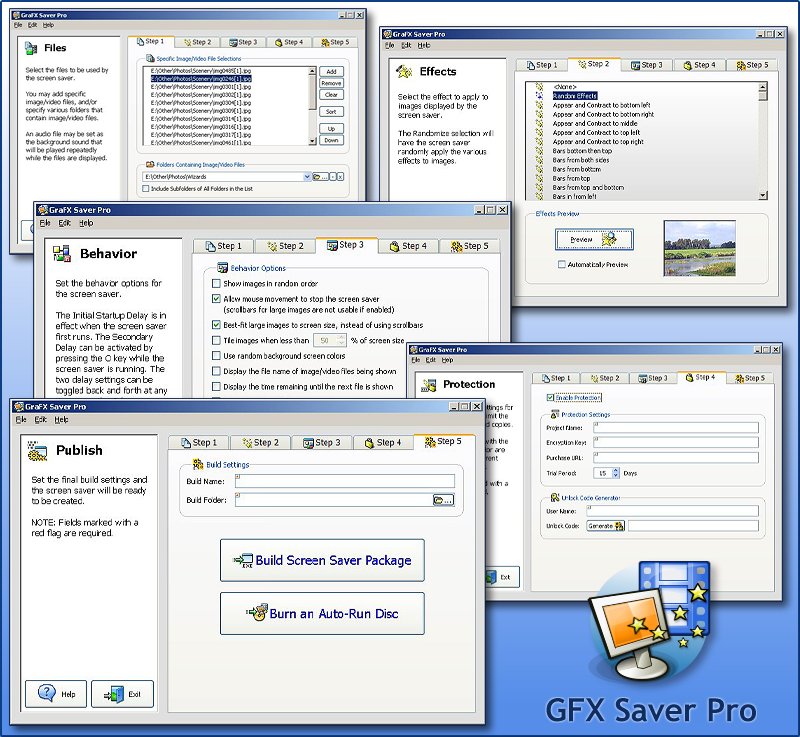
- You can create professional screen savers quickly and easily by selecting each tab on GraFX Saver Pro\\'s intuitive interface.
- Start with Step 1, Files, to select the individual image and video files or the folders you want in your screen saver.
- You can also select an audio file to use as background sound.
- Go to Step 2, Effects, to choose from over 100 special effects for displaying files.
- Step 3, Behavior, allows you to customize your screen saver further.
- You can control how image/video files are displayed and in what order and apply various functionality settings.
- The next tab, Step 4, Protection, gives you the option to protect your screen saver, provide a trial version, create unlock codes for end-users, and enable online purchasing for your created screen savers.
- Finally, choose Step 5, Publish, to build your screen saver installation package.
Technical Specifications
- Publisher: Grafxsaver.com
- License: Shareware
- Operating System: Windows 7, Windows 8, Windows 10, Windows 11
- Category: System Utilities / System Optimization
GraFX Saver Pro Screenshot