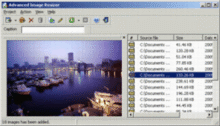
Advanced Image Resizer - Batch Image Processing Tool
3.85/5 (315 Reviews)
Advanced Image Resizer can convert images, resize images in 8 ways with 12 resizing filters, add text captions and image watermarks on images, and generate web image galleries.
Multimedia And Design
Image And Graphic Design
Shareware
FREE DOWNLOAD (v2.0.22)
File Size: 1.24MB | Official Download
Key Features of Advanced Image Resizer
- Advanced Image Resizer is a multifunctional image converter and resizer.It has the following advantages:You are capable of adding unlimited image files to the source image list,or previewing each image in the preview bar,or adding caption for each image item, or auto renaming the output image files.You are capable of resizing images in 8 ways (No Resize, Best Fit, Fixed Width, Fixed Height, Exact Size, Auto Crop, Crop Vertical, Crop Horiz) with 12 resizing filters to give the best result of image resize.It also allows you to switch images between the most popular image formats: BMP, JPG, GIF, PNG, PCX, PSD, TIF, TGA, EMF, WMF.and add caption text on output image.While use it ,you can set the text font, color, size, position, opacity, effects,add image watermark on output image.You can choose a transparent color, set position, opacity of the overlay image.You also can generate HTML files for the thumbnails,and use html template file to create your own web image galleries.
Technical Specifications
- Publisher: Etrusoft.com
- License: Shareware
- Operating System: Windows 7, Windows 8, Windows 10, Windows 11
- Category: Multimedia And Design / Image And Graphic Design
Advanced Image Resizer Screenshot