Actual Window Minimizer Enhancer
4.67/5 (116 Reviews)
Use Actual Window Minimizer for more practical and effortless window management.
System Utilities
System Optimization
Shareware
FREE DOWNLOAD (v7.3)
File Size: 5877KB | Official Download
Key Features of Actual Window Minimizer
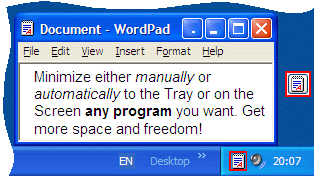
- Actual Window Minimizer lets you minimize windows to the system tray or any desktop spot by various means.
- This includes the Minimize-to-Tray button in window`s title bar, hotkey use and automatic minimization upon window startup or deactivation.
- Also, you can set default (Minimize or Close) buttons to minimize a window to tray.
- All these features let you organize your workspace with ease.
- The tool supports all windows, even command prompt ones.
How to minimize any window to the system tray
Actual Window Minimizer gives you full control over your desktop space. Follow these steps to hide applications you are not actively using:
-
Look for the New ButtonAfter installation, look at the top right corner of any open window. You will see a new Minimize-to-Tray button added next to the standard Windows Minimize button. It usually looks like a small dot or underscore.
-
Send a Window to the TrayClick this new button. The window will vanish from your screen and taskbar. Look at the notification area (system tray) near your clock. You will see the icon for that application sitting there.
-
Restore the WindowTo bring the application back, simply click its small icon in the system tray once. The window will pop back up exactly where it was before you minimized it.
-
Set Automatic RulesOpen the Actual Window Minimizer configuration panel. You can set specific rules for programs you use often. For example, you can tell it to automatically minimize your email client to the tray every time Windows starts, so it is always running but never in your way.
Pro Tip: You can change the default behavior of the standard Windows minimize button. In the settings, you can make it so that right clicking the normal minimize button sends the app to the tray, while left clicking behaves normally.
Frequently Asked Questions
Yes. Actual Window Minimizer is fully compatible with all modern versions of Windows, including Windows 10 and Windows 11. It supports both 32 bit and 64 bit editions.
Yes. You can define a global hotkey (like Win+M) to minimize the active window to the tray instantly. This allows you to clear your screen without taking your hands off the keyboard.
Yes. You can download and use the fully functional software for 14 days free of charge. After the trial period expires, you must purchase a license key to continue using the Minimize to Tray features.
Yes. The tool works with almost any window, including command prompt windows, legacy applications, and modern web browsers. If a window has a title bar, Actual Window Minimizer can likely handle it.
Technical Specifications
- Publisher: Actualtools.com
- License: Shareware
- Operating System: Windows 7, Windows 8, Windows 10, Windows 11
- Category: System Utilities / System Optimization
Actual Window Minimizer Screenshot