Online Desktop Presenter Utility
4.99/5 (376 Reviews)
Present your windows desktop online via Internet to any other user without any problems of firewalls.
Business And Productivity
Office Suite
Shareware
FREE DOWNLOAD (v1.9.12.6)
File Size: 1.5MB | Official Download
Key Features of Online Desktop Presenter
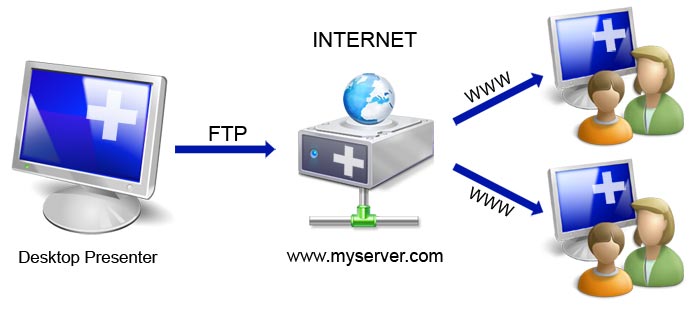
- Present your windows desktop via Internet to any other user without any problems of firewalls nor any other security related installations.
- Transmit your screen content online via Internet or Intranet for presentations, trainings, sales conversations etc.
- to one or several remote Internet users.
- Your screen content will be transmitted via FTP to your own web server or to free web space automatically and continously.
- Your remote dialog partners such as customers, partners, colleagues and co-workers can follow your desktop presentation system-independent (Windows, Mac, Linux etc.) only by opening the corresponding web address in their browser; no additional installation of any kind is needed on their side.
- Program Features - Data transmission of your Windows desktop in rapid sequences.
- - Possibility to show a partial screen region only.
- - Start/pause/stop of transmission of your desktop.
- - Setting of any possible subdirectory of a web server or web space accessible by FTP.
- - Use of free web space if no own web server is available.
- - There is only about 300 KB space in a subdirectory on the web server needed, nothing else has to be installed additionally.
- - On Apache web servers the access can be additionaly restricted by a user login (htaccess).
- - Possibility to preview the image of the presentation as the remote Internet user will see it.
- - There can be shown any web address to the remote Internet user after the termination of the presentation.
- - Deletion of the presentation on the web server after termination of the presentation.
- System Requirements On presentator\\'s side: Windows 98/2000/XP/Vista/7 Internet access (temporary or permanent) FTP access to a subdirectory of a web server (own or free web space) On remote Internet user\\'s side: Any operating system with any browser (Javascript activated by default) Internet access (temporary or permanent)
Technical Specifications
- Publisher: Infonautics.ch
- License: Shareware
- Operating System: Windows 7, Windows 8, Windows 10, Windows 11
- Category: Business And Productivity / Office Suite
Online Desktop Presenter Screenshot