Linkman Professional Utility
3.93/5 (279 Reviews)
Linkman is a bookmark manager that integrates with Chrome, Firefox, Internet Explorer, and Opera.
Internet And Network
Browsers And FTP
Shareware
FREE DOWNLOAD (v8.99)
File Size: 8.9MB | Official Download
Key Features of Linkman Pro
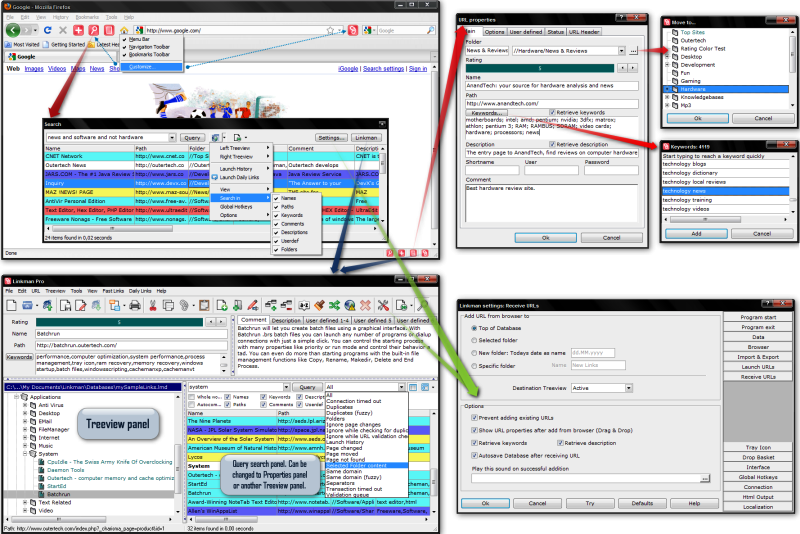
- Linkman is a bookmark manager that efficiently organizes and validates large numbers of bookmarks.
- Linkman integrates with Google Chrome, Firefox, Internet Explorer, and Opera browsers.
- Support for bookmark sync between browsers and among computers is also available.You get the choice to manage your bookmarks by keywords only, folders only, or folders and keywords.
How to master your bookmarks with Linkman
Linkman eliminates "bookmark bloat" by allowing you to manage massive link collections in a lightning-fast, unified database. Follow these 4 steps to get started:
-
Import Your Existing BookmarksYou don't have to start from scratch. Go to File > Import in the main menu. Select your source (e.g., Google Chrome, Firefox, or an HTML file) and Linkman will pull your existing folder structure directly into its XML database.
-
Search with the "Power Search"Forget scrolling through endless folders. In the Linkman main window or browser extension, just start typing in the search bar. Use wildcards and operators (e.g.,
"manual -pdf") to find exact matches instantly, even if you have over 100,000 links. -
Synchronize Across BrowsersInstall the Linkman Addon for each browser you use (Chrome, Firefox, Opera, Edge) and enable "Auto-Sync". When you add a bookmark via the Linkman icon in Chrome, it is immediately available in Firefox and your other browsers.
-
Clean Your Collection (Link Validation)Over time, websites go dark. Select a folder and click the Check URLs icon. Linkman will scan for "404 Not Found" errors, page movements, or content changes, allowing you to delete or update dead links in bulk.
Pro Tip: Need to take your bookmarks on the go? With Linkman Pro, you can install a portable version directly onto a USB stick and access your fully synced, password-protected database on any computer.
Frequently Asked Questions
Yes. Linkman is fully compatible with Windows 10 and 11, as well as legacy systems like Windows 7, Vista, and XP (both 32 and 64-bit).
Yes, with Linkman Pro. You can sync your bookmark database across multiple computers using cloud services like Dropbox, Google Drive, or OneDrive. Alternatively, you can run the portable version from a USB drive.
Linkman Lite is free for private use and supports up to 10,000 bookmarks (split across two databases). Linkman Pro has unlimited bookmark capacity, includes advanced "dead link" checking, supports cloud synchronization across multiple PCs, and offers professional technical support.
This usually happens if the Linkman Addon isn't installed or active in your current browser. Visit the Outertech "Addons" page to download the specific extension for Chrome, Firefox, or Opera. Also, ensure the main Linkman desktop application is running in the background.
Absolutely. Unlike cloud-only bookmarking services, Linkman stores your bookmarks in a local, ultra-fast XML database on your hard drive. You can also password-protect your database for an extra layer of privacy.
Yes. You can organize by folders, keywords, or a combination of both. To save you time, Linkman can automatically extract keywords and descriptions straight from the web pages you bookmark.
Technical Specifications
- Publisher: Outertech.com
- License: Shareware
- Operating System: Windows 7, Windows 8, Windows 10, Windows 11
- Category: Internet And Network / Browsers And FTP
Linkman Pro Screenshot