Project Analyzer for Visual Basic
4.48/5 (263 Reviews)
Optimize your programs.
Development And IT
Coding Utilities
Shareware
FREE DOWNLOAD (v10)
File Size: 8MB | Official Download
Key Features of Project Analyzer
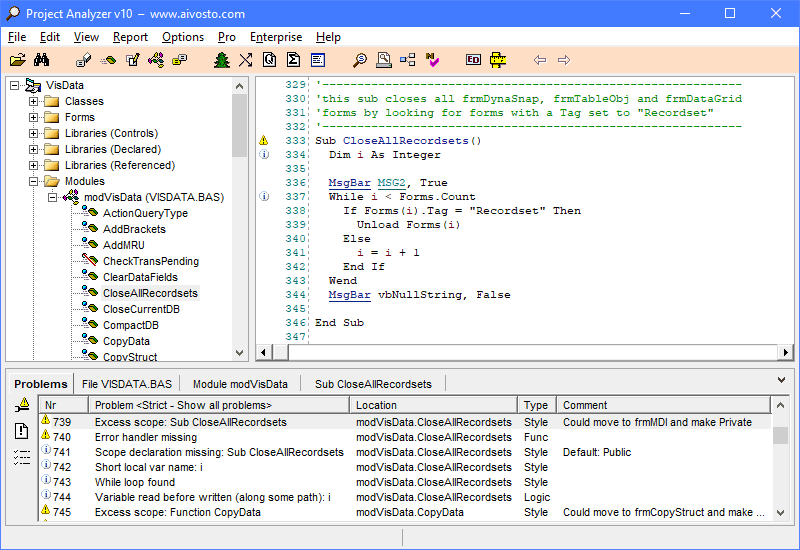
- Document and browse your code as hypertext and graphical call trees.
- Remove dead code and fix coding problems automatically.
- Prepare existing code for VB.NET.
- It shows the structure of a project graphically, and lets you browse your code in a hypertext window.
- It also contains numerous optimization and measurement features that help in fine-tuning and monitoring software development.
- By removing dead code, you get smaller and thus faster executables.
- - Easier maintenance, less errors, improved software quality, and faster moving of projects from one programmer to another - this is what you get with Project Analyzer.
- It detects several types of programming problems, like unused variables, dead code, missing variable types, name conflicts, objects with wrong scope, and events missing code.
- - Project Analyzer analyzes design quality with industry standard metrics of complexity, understandability and reusability.
- It counts lines of code too.
- In its analysis, the program makes extensive use of cross-reference information.
Technical Specifications
- Publisher: Aivosto.com
- License: Shareware
- Operating System: Windows 7, Windows 8, Windows 10, Windows 11
- Category: Development And IT / Coding Utilities
Project Analyzer Screenshot