Portmaster - 2026 Edition Firewall Utility
4.04/5 (21 Reviews)
Portmaster is a free and open source application firewall that restores your privacy.
Security And Privacy
Privacy Tools
Open Source
FREE DOWNLOAD (v1.6.4)
File Size: 185.0MB | Official Download
Key Features of Portmaster
- Portmaster is a premier open source utility designed for high performance network monitoring and advanced application firewall management.
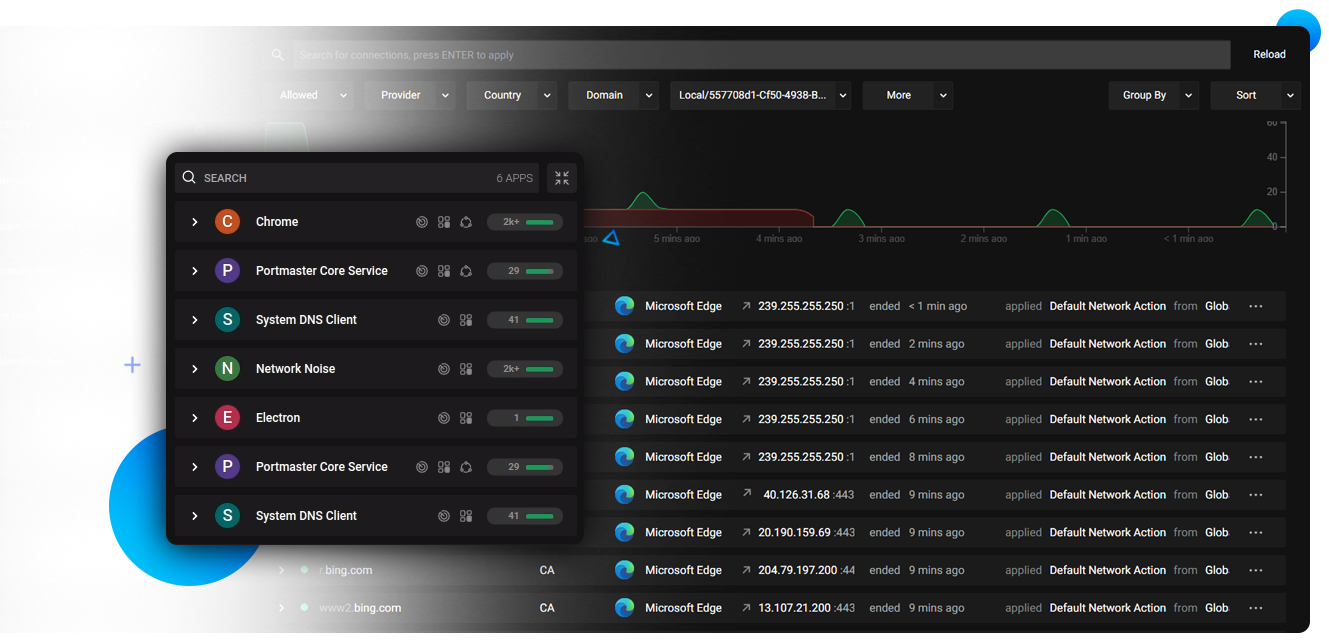
- It provides users with a remarkably robust environment to visualize every outgoing connection and block trackers with absolute precision.
- The software features an integrated privacy engine that handles per app settings and global encryption allowing for seamless protection of digital identities.
- In 2026 it remains a vital tool for security professionals needing a safe and verified environment for monitoring data leaks across diverse hardware configurations.
- Its support for SPN networking and a highly detailed dashboard ensures that every network task is handled with incredible speed and professional grade accuracy.
- Portmaster is the globally trusted choice for powerful and reliable privacy control across all modern desktop platforms.
How to stop apps from spying on you with Portmaster
Portmaster is a powerful, free, and open-source application firewall. It solves a massive privacy problem: modern software and operating systems constantly "phone home" with telemetry and tracking data in the background. Portmaster exposes every hidden connection on your PC and lets you block ads, trackers, and rogue apps system-wide. Follow these steps to lock down your network:
-
Install and Set Global RulesDownload and install the software. During the initial onboarding, Portmaster will ask you to select a base privacy level. This sets up your global blocklists, automatically stopping known ads, malware, and tracking domains across every app on your computer.
-
Monitor Live Network ActivityOpen the Portmaster UI and navigate to the Network Monitor. Here, you will see a real-time, easy-to-read list of every single application currently accessing the internet, including hidden Windows background services.
-
Block Specific Apps or DomainsIf you spot an offline game or a basic utility app suspiciously connecting to the internet, click on it. You can toggle a single switch to completely Block Internet Access for that specific app, or dive into its connections to block specific analytic domains while letting the app otherwise function normally.
-
Secure Your DNS QueriesBy default, Portmaster automatically encrypts your DNS traffic (using Secure DNS / DNS-over-TLS). This prevents your Internet Service Provider (ISP) from snooping on the websites you visit. You can customize your preferred Secure DNS provider in the settings.
Pro Tip: Are you traveling and trying to connect to a hotel or airport Wi-Fi, but the login page won't load? Portmaster's Secure DNS sometimes blocks these "Captive Portals." Simply look for the prompt in the Portmaster UI to temporarily allow the captive portal connection so you can log in!
Frequently Asked Questions
Portmaster operates as a kernel-level network filter to intercept and analyze traffic. This can sometimes cause conflicts with third-party VPNs or aggressive antivirus web shields that try to hook into the same network layers. Most modern VPNs work fine, but if you experience issues, check Safing's official documentation for specific VPN workarounds, or toggle Portmaster's settings to bypass the VPN's virtual network adapter.
By default, Portmaster applies strict privacy settings, which may block Local Area Network (LAN) connections to prevent rogue applications from scanning your home network for vulnerabilities. To fix this, open your Global Settings in Portmaster, search for Force Block LAN, and disable it, or explicitly trust your local network subnet.
Yes. The core Portmaster application—which includes the network monitor, the per-app firewall, and the global ad/tracker blocking—is completely free and open-source. Safing makes money by offering an optional premium add-on called the Safing Privacy Network (SPN), which acts as a Tor-like, multi-hop VPN alternative for users who want to mask their IP addresses.
Currently, Portmaster is fully supported on Windows and Linux. A macOS version is actively in development but has historically faced challenges due to Apple's strict restrictions on kernel extensions. There are currently no official iOS or Android versions available.
Technical Specifications
- Publisher: Safing.io
- License: Open Source
- Operating System: Windows 7, Windows 8, Windows 10, Windows 11
- Category: Security And Privacy / Privacy Tools
Portmaster Screenshot