MusicBee - Freeware PC Music Utility

4.56/5 (30 Reviews)

MusicBee makes it easy to manage find and play music files on your computer supporting podcasts and web radio.

Multimedia And Design Video And DVD Freeware
FREE DOWNLOAD (v3.5.8)
File Size: 12.4MB | Safe & Verified

Key Features of MusicBee

  • MusicBee is a premier freeware utility designed for high performance audio playback and advanced music library management.
  • It provides users with a remarkably robust environment to organize massive collections of FLAC and MP3 files applying auto tagging and custom skins with absolute precision.
  • In 2026 it remains a vital tool for audiophiles needing a safe and verified environment for perfect bit audio output and seamless podcast integration.

How to organize your massive music collection with MusicBee

MusicBee makes it easy to manage, play, and find music files stored on your computer. Follow these steps to build the ultimate, highly organized local music library:

  1. Install and Import Your Music
    Download the installer or portable version from the official website. On your first launch, MusicBee will ask to scan your computer for music. Point it to your main music folder, or select the option to import your existing library directly from iTunes or Windows Media Player.
  2. Fix Messy Tags and Album Art
    If your songs say "Unknown Artist," highlight them, right-click, and select Auto-Tag by Track or Auto-Tag by Album. MusicBee will scan the digital fingerprint of the audio, query databases like MusicBrainz, and automatically download the correct song names, track numbers, and high-res album art.
  3. Optimize Your Audio Quality
    Click the "MusicBee" menu in the top-left corner and go to Edit > Edit Preferences > Player. Under the Output dropdown, change the setting from DirectSound to WASAPI (Shared) or ASIO. This bypasses the Windows volume mixer and delivers the purest possible audio to your speakers or headphones.
  4. Customize Your Interface
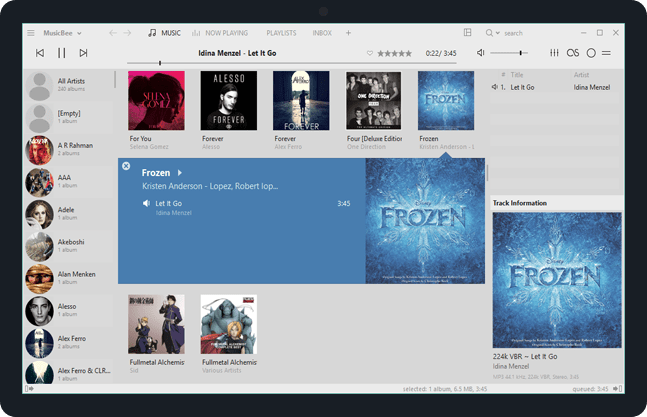
    MusicBee is heavily customizable. Click the Arrange Panels icon (the square icon next to the search bar) to add or remove features like a mini-lyrics viewer, an artist biography panel, or a spectrum visualizer. You can also download hundreds of custom "Skins" from the community forums to change the colors and layout.
Pro Tip: Use the Inbox feature! When you download new music, send it to the "Inbox" folder first. This gives you a safe space to fix tags, add album art, and rename files before they get permanently mixed into your beautifully organized main library.

Frequently Asked Questions

Yes. MusicBee is 100% freeware. There are no premium versions, no locked features, and absolutely no advertisements. The solitary developer behind the software works on it passionately and accepts optional donations via PayPal to help cover server costs.

No. MusicBee is built specifically for Windows (Windows 7, 8, 10, and 11) using the Microsoft .NET framework. However, many Linux and Mac users successfully run the software using compatibility layers like WINE or CrossOver.

Yes. MusicBee has a fantastic built-in device sync tool. If you plug in an Android phone, MP3 player, or USB drive, you can configure MusicBee to automatically sync specific playlists or your entire library. It can even convert large FLAC files to smaller MP3 files "on the fly" while copying them to your device to save storage space.

If you can't hear your web browser or video games while music is playing, you likely enabled WASAPI (Exclusive) in your player settings. This is a highly sought-after audiophile feature that gives MusicBee absolute, uninterrupted control over your soundcard for the highest audio fidelity. To fix it, simply go to your Player preferences and change the output to WASAPI (Shared) or DirectSound.

Technical Specifications

MusicBee Screenshot

Screenshot of Download MusicBee | Free Windows Audio Tool