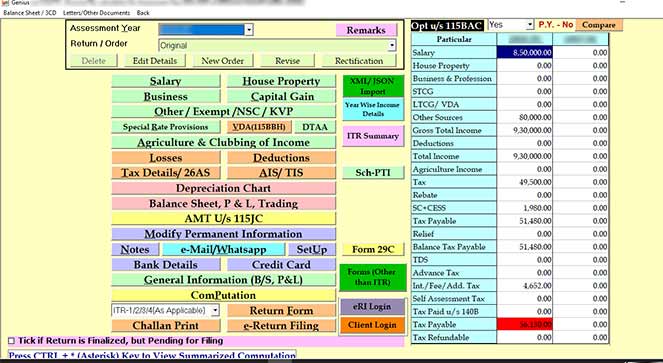
GenIT Income Tax Professional Secure Tax Return Utility
4.08/5 (17 Reviews)
Gen IT is a comprehensive income tax software for fastest ITR filing and tax computation in India.
Business And Productivity
Office Suite
Trialware
FREE DOWNLOAD (v26.1.0)
File Size: 85MB | Safe & Verified
Key Features of Gen IT Income Tax
- Gen Income Tax GenIT is a premier tax utility designed for high performance income tax return filing and advanced financial computation.
- It provides a complete solution for calculating self assessment tax, advance tax, and interest under sections 234A, 234B, and 234C with total accuracy.
- The software features automated form selection and seamless JSON generation for ITR 1 through ITR 7, ensuring full compliance with the latest government regulations.
- In 2026, it remains a vital tool for chartered accountants and tax professionals needing a safe and verified environment for bulk e-filing and importing data from AIS, TIS, and Form 26AS.
- Its robust audit tools and direct link to the IT portal allow for rapid document management and status tracking.
- Gen IT is the globally trusted choice for error free taxation and efficient fiscal reporting across all business sectors in India.
How to File Income Tax Returns with Gen IT
Gen IT simplifies the ITR filing process by automating data entry and form selection. Follow these steps to prepare and e-file your tax returns efficiently:
-
Import Taxpayer DataStart by creating or selecting a client. Use the Import feature to fetch data from pre-filled JSON files, previous year records, or directly from the ITD portal (AIS, TIS, and Form 26AS) to minimize manual entry errors.
-
Automatic Form Selection and ComputationEnter the relevant income details under different heads. The software will automatically select the correct ITR form (ITR-1 to ITR-7) and calculate taxes, including interest under sections 234A/B/C and Arrear Relief.
-
Generate XML/JSON and ValidateOnce the computation is complete, go to the E-Filing tab to generate the required XML or JSON file. The built-in error-checking algorithm will highlight any inconsistencies that need to be resolved before submission.
-
Upload to ITD PortalUse the Quick Upload facility to transmit your data directly to the Income Tax Department website. You can also handle e-payments of challans (280, 281, 282) and download the ITR-V acknowledgment directly within the app.
Pro Tip: Use the "Bulk Contact Verification" feature to verify multiple clients' PINs or email statuses simultaneously, saving hours during peak tax season!
Frequently Asked Questions
The desktop-based version provides enhanced data security and confidentiality. Since tax data is stored locally on your machine, it minimizes the risk of unauthorized online access and allows you to work without a constant internet connection.
To import 26AS, open the software, go to Income Tax > Computation, and select your client. Navigate to the "Tax Information" tab and select Import from 26AS. You can then choose to import via "Quick Invisible Mode" or Google Chrome.
Yes. Gen IT is updated with the latest schemas for ITR-1 through ITR-7 for AY 2025-26. The software is perpetually updated as soon as the CBDT releases new forms or schema changes on the Income Tax Portal.
Most update issues are caused by restrictive firewall settings or a lack of administrative rights. Ensure you Run as Administrator and check your internet connection. If the issue persists, SAG Infotech provides dedicated technical support via their helpline to assist with manual updates.
Technical Specifications
- Publisher: Saginfotech.com
- License: Trialware
- Operating System: Windows 7, Windows 8, Windows 10, Windows 11
- Category: Business And Productivity / Office Suite
Gen IT Income Tax Screenshot