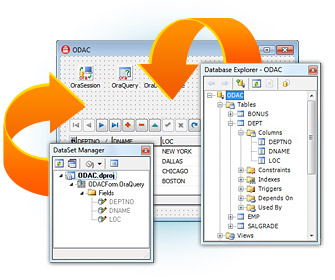
Oracle Data Access Components for Delphi 7
3.83/5 (523 Reviews)
ODAC is a VCL/VCL.
Development And IT
Languages And Scripts
Shareware
FREE DOWNLOAD (v10.1)
File Size: 4195KB | Official Download
Key Features of Oracle Data Access Components for Delphi 7
- ODAC is a VCL/VCL.NET/CLX component library for fast direct access to Oracle from Delphi, and C++Builder.
- ODAC includes comprehensive support for Oracle functionality, including Oracle Advanced Queuing, Oracle TAF, and distributed transactions.
- Main advantages include direct access to Oracle data, Disconnected Model for working with data offline, Local Failover support, optimized code base, and advanced design-time integration.
How to connect to Oracle without the Client software
Devart ODAC allows you to build high-performance Delphi and C++Builder applications that connect natively to Oracle. Follow these steps to set up your direct connection:
-
Configure the Connection (TOraSession)Drop a TOraSession component onto your form. In the Object Inspector, set your Username, Password, and Server. To bypass the bulky Oracle Client installation entirely, set the Options.Direct property to True. This enables Direct Mode communication via TCP/IP.
-
Retrieve Your Data (TOraQuery)Link a TOraQuery component's Session property to the TOraSession you just created. Enter your SQL command in the SQL property (e.g.,
SELECT * FROM Employees) and set Active to True to fetch and view your data instantly at design-time. -
Move Large Datasets Fast (TOraLoader)If you need to migrate or insert millions of rows, avoid using standard Insert statements. Use the TOraLoader component instead. It utilizes Oracle’s Direct Path Load interface to bypass the standard SQL engine, giving you maximum data transfer speeds.
-
Deploy Your ApplicationCompile your application. Because you used Direct Mode, your final executable is completely standalone. You can easily deploy it to end-user machines without worrying about configuring
tnsnames.orafiles or installing any extra Oracle dependencies.
Pro Tip: Want to develop for mobile? ODAC fully supports the FireMonkey (FMX) framework, allowing you to compile your native Oracle-connected applications for Windows, macOS, Linux, iOS, and Android from a single codebase.
Frequently Asked Questions
No. If you use ODAC’s Direct Mode, your application communicates directly with the Oracle server via TCP/IP. This simplifies deployment significantly as you don't have to manage
tnsnames.ora or Oracle Home configurations on client PCs.
This usually happens in OCI Mode (non-direct). It means Oracle cannot find your database alias. To fix this, check your
tnsnames.ora file for typos, or ensure the TNS_ADMIN environment variable points to the correct folder. Better Solution: Switch to Direct Mode in your TOraSession component to bypass TNS configuration entirely.
This error occurs when the application is looking for an Oracle Client that isn't installed, or there is an architecture mismatch (e.g., a 64-bit app trying to use a 32-bit client). You can fix this by either installing the matching Oracle Instant Client, or simply enabling Direct Mode in your ODAC connection settings to remove the dependency on the registry and client software.
Yes. Devart regularly updates ODAC to support the newest versions of Oracle (including 23c, 21c, and 19c) and the latest Embarcadero RAD Studio (Delphi & C++Builder) releases. It also fully supports the FireMonkey (FMX) framework for native cross-platform development on Windows, macOS, Linux, iOS, and Android.
Technical Specifications
- Publisher: Devart.com
- License: Shareware
- Operating System: Windows 7, Windows 8, Windows 10, Windows 11
- Category: Development And IT / Languages And Scripts
Oracle Data Access Components for Delphi 7 Screenshot