RKill: Terminate Active Malware Processes
4.93/5 (74 Reviews)
rKill is an easy to use tool that kills known processes that stop the use of our normal anti-malware applications.
Security And Privacy
Anti Malware And Antivirus
Freeware
FREE DOWNLOAD (v2.9)
File Size: 1.72MB | Official Download
Key Features of rKill
- RKill is a program developed at BleepingComputer.com that was originally designed for the use in our malware removal guides.
- It was created so that we could have an easy to use tool that kills known processes that stop the use of our normal anti-malware applications.
- Just kill known malware processes so that anti-malware programs can do their job.
How to prep your infected PC for cleaning using RKill
Malware often blocks antivirus software from opening. RKill solves this problem by terminating malicious background processes so your normal security software can finally run. Follow these 4 steps to regain control of your computer:
-
Download the Right FilenameHead to BleepingComputer to download RKill. If your malware actively blocks security tools from launching, don't panic. Download one of the disguised versions provided on the page (like
iExplore.exeorexplorer.exe) to trick the virus into letting it run. -
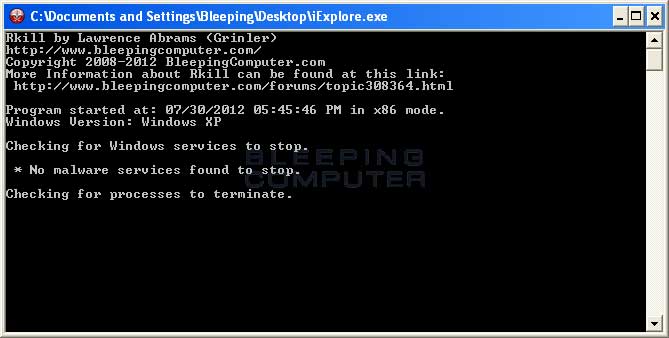
Run the ProgramDouble-click the downloaded file. RKill will immediately begin scanning your system. It will aggressively terminate known malware processes, remove incorrect executable associations, and fix Windows policies that are preventing you from using your administrative tools.
-
Review the Output LogWhen the process is completely finished, RKill will generate and display a text log file on your screen. This document shows exactly which malicious processes were terminated and which policies were repaired while the program was running.
-
Scan Immediately (Do NOT Reboot)Because RKill only kills active processes and does not delete the actual virus files, you must immediately launch your preferred anti-malware or anti-virus program to perform a full system scan and permanently delete the infections.
Pro Tip: Do not restart your computer after running RKill! If you reboot your PC before running your antivirus scan, the malware that is configured to start automatically with Windows will simply launch all over again.
Frequently Asked Questions
No. RKill is not a traditional antivirus. It only terminates the running processes of known malware and repairs broken system policies so that your regular security software can function. It does not actually delete the malicious files from your hard drive.
Some advanced malware is programmed to block any file named "RKill" from executing. To bypass this, BleepingComputer offers RKill under several disguised, standard Windows filenames (such as
iExplore.exe, uSeRiNiT.exe, or WiNlOgOn.exe). Download one of these alternate links and try running it again.
Because RKill aggressively targets active processes and modifies Windows policies to restore functionality, some security programs (like Malwarebytes or Comodo) may mistakenly flag it as suspicious. As long as you download it directly from BleepingComputer, this is a "false positive" and the alert can be safely ignored.
RKill is highly compatible and makes no permanent changes to the OS. It officially supports Windows XP, Vista, 7, 8, and Windows 10 (on both 32-bit and 64-bit systems). Community users report that it continues to work well on Windows 11 as well.
Yes! RKill is an incredibly small, standalone executable (less than 2 MB). You can easily download it on a clean computer, save it to a USB flash drive or CD, and then transfer it to your infected computer to run the process termination.
Technical Specifications
- Publisher: Bleepingcomputer.com
- License: Freeware
- Operating System: Windows 7, Windows 8, Windows 10, Windows 11
- Category: Security And Privacy / Anti Malware And Antivirus
rKill Screenshot