HandBrake Open Source Video Transcoding and Conversion
4.90/5 (18 Reviews)
HandBrake is an open source video transcoder that can convert video from nearly any format to modern, supported codecs.
Multimedia And Design
Video And DVD
Open Source / Freeware
FREE DOWNLOAD (v1.7.2)
File Size: 23MB | Safe & Verified
Key Features of HandBrake Video Transcoder
- HandBrake is a powerful video transcoding tool designed to be simple for beginners and deeply customizable for professionals.
- It allows you to take existing video files and convert them into various modern formats optimized for mobile devices and smart TVs.
- It includes an extensive library of built-in presets for quick selection and supports high-efficiency video coding like HEVC and AV1.
- HandBrake also handles subtitles, chapter markers, and multiple audio tracks, making it ideal for digitizing physical media libraries securely.
How to Convert Video Files for Free with HandBrake
HandBrake is a powerful open-source tool that allows you to convert video from nearly any format to modern codecs. Follow these steps to compress or convert your videos:
-
Open Your Source VideoLaunch HandBrake and click on the Open Source button. You can drag and drop a single video file or an entire folder containing multiple titles into the window.
-
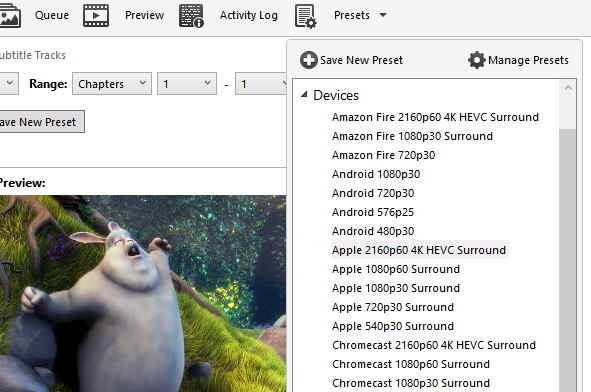
Select a PresetInstead of adjusting complex settings manually, go to the Presets menu. Choose a category like "General" (e.g., Fast 1080p30) or "Devices" if you are converting specifically for an iPhone, Android, or Playstation.
-
Choose Destination and FormatAt the bottom of the screen, click Browse to choose where to save your new file. Under the "Summary" tab, ensure the Format is set to MP4 or MKV depending on your preference.
-
Start EncodingClick the green Start Encode button at the top of the interface. The progress bar at the bottom will show you how much time remains until your video is ready.
Pro Tip: Use the "Preview" button to encode a small 30-second clip of your video first. This lets you check the quality and audio before committing to a full hour-long conversion!
Technical Specifications
- Publisher: Handbrake.fr
- License: Open Source / Freeware
- Operating System: Windows 7, Windows 8, Windows 10, Windows 11
- Category: Multimedia And Design / Video And DVD
HandBrake Video Transcoder Screenshot