WiFi Password Revealer: Find Lost WiFi Passwords on Windows
4.50/5 (424 Reviews)
Lost or forgot your password to a wireless network? It must be stored somewhere in the system, right? WiFi password revealer will show you password to all wireless networks you ever connected with your PC
Security And Privacy
Encryption And Passwords
Freeware
FREE DOWNLOAD (v1.0.0.7)
File Size: 3.9MB | Official Download
Key Features of WiFi password revealer
- WiFi password revealer is a small program which will show you all stored passwords to your wireless (WiFi) network(s).
- Each time you connect to a wireless network using a password - Windows OS encrypts and stores it in the system.
- This program (WiFi password revealer) will find, decrypt and show you all your WiFi passwords, whenever it is your home wireless network with WPA / WPA2 encryption or WEP network in a coffee-shop.
- WiFi password revealer can recover WiFi passwords from on Windows XP, Windows Vista, 7 and 8.
How to recover your lost WiFi password
Recovering your wireless key takes less than a minute. Follow these simple steps:
- Download and run the WiFi Password Revealer installer.
- Launch the program. It will automatically scan your Windows system for stored wireless profiles.
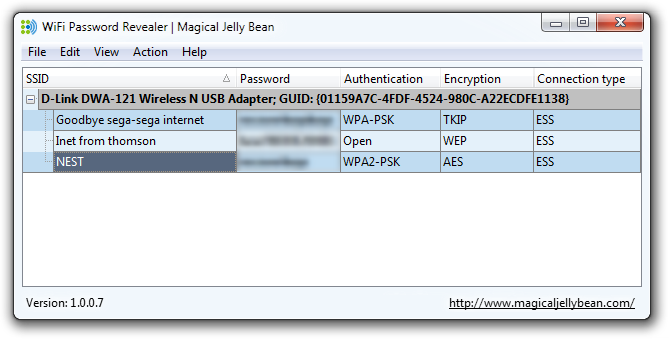
- You will see a list of all networks (SSID) you have connected to in the past.
- Look at the "Password" column to see the decrypted key in plain text.
- Right-click any entry to "Copy Password" to your clipboard.
Note: You must have Administrator rights on your PC to decrypt these keys.
Frequently Asked Questions
Yes. WiFi Password Revealer reads keys locally from your own Windows Registry. It does not send your passwords to the cloud or any external server.
Yes, it is fully compatible with Windows 11, Windows 10, Windows 8, and Windows 7 (32-bit and 64-bit versions).
Technical Specifications
- Publisher: Magicaljellybean.com
- License: Freeware
- Operating System: Windows 7, Windows 8, Windows 10, Windows 11
- Category: Security And Privacy / Encryption And Passwords
WiFi password revealer Screenshot