PropertyEditor Component
3.93/5 (156 Reviews)
PropertyEditor extends the context menu of Windows Explorer to let you edit a great variety of properties for the selected file, folder, or drive.
System Utilities
System Optimization
Shareware
FREE DOWNLOAD (v5.0)
File Size: 3.41MB | Official Download
Key Features of PropertyEditor
- PropertyEditor is a context menu extension for Windows Explorer.
- Upon installation, it adds a host of new property editing capabilities.
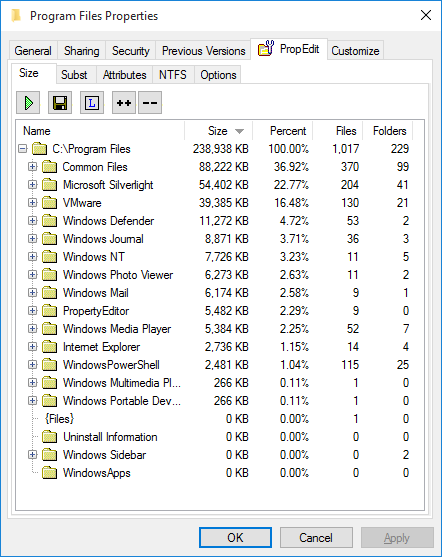
- It lets you configure the context menu for the selected files, folders, or drives, change icons for the selected files and folders, create a report about the content of any selected drive or folder (the size of all subfolders and files is included).
- Also, you can now configure many NTFS parameters, including Streams, Junctions, Hard Links, and Mount Points.
- Plus, there\'s an ability to learn who has access to encrypted files.The benefits of PropertyEditor are numerous.
- With PropertyEditor in place, you can make your context menu more usable and less confusing by hiding or removing unwanted items.
- Its detailed reports about the usage of hard disk space can help you better organize your disk space for convenient computing.
- PropertyEditor gives you a refreshingly quick way to customize Windows icons, which, compared to standard Windows, is much faster and more convenient.
- You can also take advantage of the NTFS file system parameters.
- Unlike Windows, PropertyEditor gives you the tools for configuring such parameters.PropertyEditor seamlessly integrates into the Windows shell and works totally transparently throughout the Operating System.
- It has a low memory footprint and does not cut down on system productivity, or slow down other applications.
- Added property editing options can be accessed via the context menu of a file, folder or a drive.
- All editing efforts are performed with just a few simple clicks.
- The program has a multilingual support.
Technical Specifications
- Publisher: Usefulsoft.com
- License: Shareware
- Operating System: Windows 7, Windows 8, Windows 10, Windows 11
- Category: System Utilities / System Optimization
PropertyEditor Screenshot