FreeFileSync Utility
4.43/5 (283 Reviews)
FreeFileSync is a free backup software that helps you to compare and synchronize files and folders on Windows, Linux and macOS.
System Utilities
System Optimization
Freeware
FREE DOWNLOAD (v10.2)
File Size: 13.90MB | Official Download
Key Features of FreeFileSync
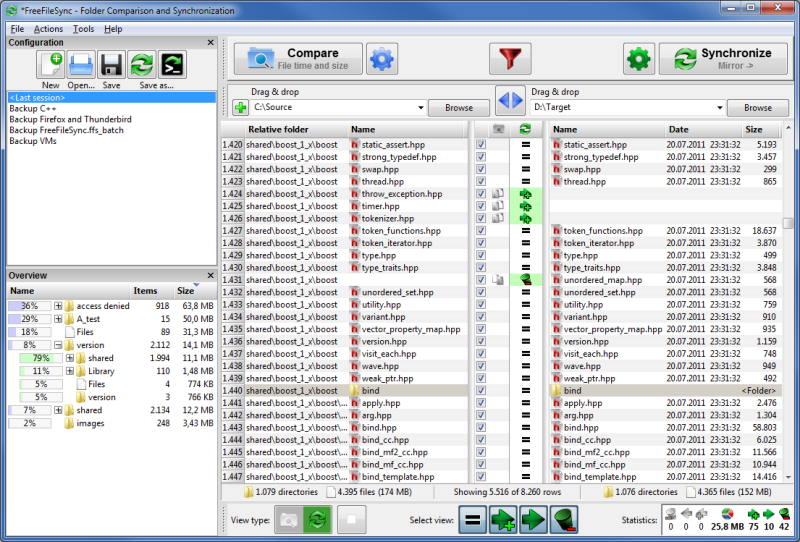
- FreeFileSync is a free backup software that helps you to compare and synchronize files and folders on Windows, Linux and macOS.
- It is designed to save your time setting up and running backup jobs while having nice visual feedback along the way.Features:- Detect moved and renamed files and folders- Copy locked files (Volume Shadow Copy Service)- Detect conflicts and propagate deletions- Binary file comparison- Configure handling of Symbolic Links- Automate sync as a batch job- Process multiple folder pairs- Comprehensive and detailed error reporting- Copy NTFS extended attributes (compressed, encrypted, sparse)- Copy NTFS security permissions- Support long file paths with more than 260 characters- Fail-safe file copy- Cross-platform: Windows, Linux, Mac OS X- Expand environment variables like %USERPROFILE%- Access variable drive letters by volume name (USB sticks)- Native 64-bit support- Keep versions of deleted/updated files- Prevent disc space bottlenecks via optimal sync sequence- Full Unicode support- Highly optimized runtime performance- Include/exclude files via filter- FreeFileSync portable and local installation available- Handle daylight saving time changes on FAT/FAT32- Use macros %time%, %date%, et al.
- for recurring backups- Case-sensitive synchronization- Built-in locking: serialize multiple jobs running against the same network share
Technical Specifications
- Publisher: Freefilesync.org
- License: Freeware
- Operating System: Windows 7, Windows 8, Windows 10, Windows 11
- Category: System Utilities / System Optimization
FreeFileSync Screenshot