Examine32: Fast File and Text Search Utility
3.54/5 (383 Reviews)
Examine32 Text Search is a fast and versatile text search utility.
System Utilities
File Management
Shareware
FREE DOWNLOAD (v5.02)
File Size: 1.54MB | Official Download
Key Features of Examine32 Text Search
- Examine32 Text Search is a fast and versatile text search utility.
- It can search both text and binary files using either ordinary text or GREP-like regular expressions, based on the standard UNIX search utility.
- The logical operators OR, AND, NOT and XOR can be used with a specified search proximity.
- Files within ZIP archives can also be searched for text.
- File formats supported by the program, in addition to text files, are text files with Unix and MacIntosh line endings, Microsoft Word format, WordPerfect, HTML format (web pages), Rich text format, PDF format (Acrobat files), XML, OpenOffice, StarOffice, Lotus Symphony and Write format.
- Searches can be across multiple drives over networks or can be restricted to a single folder with the option to search subfolders.
- The user can also select files and folders in Windows Explorer which can then be searched by either dragging and dropping them onto the program or by using the context menu produced by the right mouse button.
- Files can be viewed with their associated application, the program\'s own fully configurable internal viewer which lets the user switch quickly between matches, or with an editor of the user\'s choosing.
- The search results can be saved to disk and retrieved at a later date.
- They can also be sent to the user\'s printer.
How to Search Text Inside Files using Examine32/Examine64
Examine32/Examine64 Text Search solves the ultimate data-retrieval problem: finding specific text, code snippets, or records buried deep inside thousands of documents, PDFs, or ZIP archives. Follow these steps to master its top features:
-
Launch and Select Your Search TargetOpen the software and navigate to your target drives or folders. You can easily drag and drop folders directly from Windows Explorer into the program to set your search directory.
-
Define Your Search QueryEnter the text you want to find. For basic searches, use ordinary text. For complex queries, utilize Logical Operators (AND, OR, NOT) or GREP-like regular expressions to narrow down precise code strings or data patterns.
-
Select File Types (Optional)Filter your search by file extension. Examine32 can natively scan inside standard text files, Word (DOC/DOCX), Excel, PDFs, HTML, XML, and even compressed ZIP/ZIPX archives.
-
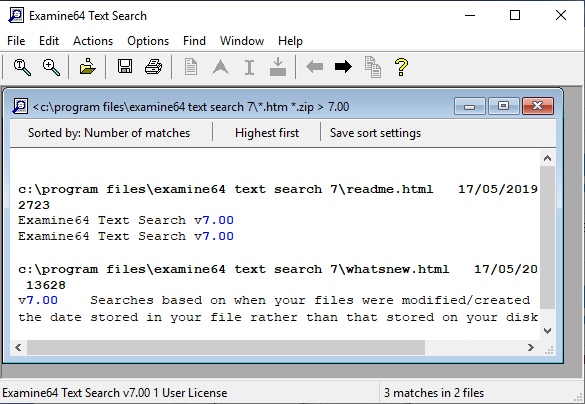
Execute and View ResultsClick search to generate a list of matches. Use the internal viewer to instantly see your text highlighted in context, complete with line numbers, allowing you to quickly verify the information.
Pro Tip: Searching for two distant words? You can specify the "search proximity" to find words that appear within a certain number of lines or characters of each other, drastically reducing false positives!
Frequently Asked Questions
No. Examine32/Examine64 natively supports a vast array of formats including Microsoft Word, Excel, PowerPoint, and PDF. You do not need the original applications installed to search the text within them.
Yes. The software is designed to effortlessly look inside ZIP and ZIPX archives, saving you time and hard drive space.
The software will prompt you to enter the password to search the encrypted file. Note that Examine32 is a search tool, not a password recovery utility; it cannot bypass encryption or recover forgotten passwords.
While it features advanced GREP and logical operator capabilities tailored for IT professionals, developers, and data analysts, its simple interface and drag-and-drop Windows Explorer integration make it perfectly suitable for everyday users trying to locate lost documents.
Technical Specifications
- Publisher: Examine64.com
- License: Shareware
- Operating System: Windows 7, Windows 8, Windows 10, Windows 11
- Category: System Utilities / File Management
Examine32 Text Search Screenshot