Actual Multiple Monitors Utility
4.72/5 (216 Reviews)
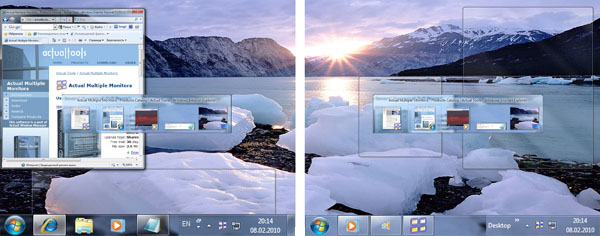
Actual Multiple Monitors clones the Windows Taskbar, Start button, system tray and the Alt-Tab Task Switcher on secondary monitors, and also offers new multi-monitor window management services, such as switching windows between monitors in a flash.
System Utilities
System Optimization
Shareware
FREE DOWNLOAD (v5.0.2)
File Size: 8510KB | Official Download
Key Features of Actual Multiple Monitors
- Actual Multiple Monitors is the comprehensive solution to improve the functionality of Windows user interface for a comfortable work with multi-monitor setups.
- The smart app emulates the Taskbar, Start button, system tray and Task Switcher on secondary monitors, and offers new window management services, such as moving a window to another monitor in a single click, easy windows dragging/sizing, emulation of Windows 7 Aero Snap for XP/Vista.
Technical Specifications
- Publisher: Actualtools.com
- License: Shareware
- Operating System: Windows 7, Windows 8, Windows 10, Windows 11
- Category: System Utilities / System Optimization
Actual Multiple Monitors Screenshot