ADEO Multi-Page TIFF Editor Utility
4.03/5 (85 Reviews)
Multi-Page TIFF Editor (MPTE) is a complete solution for viewing, editing, creating and converting multipage TIFF files.
Business And Productivity
Office Suite
Demo
FREE DOWNLOAD (v2.9.11.791)
File Size: 16531KB | Official Download
Key Features of ADEO Multi-Page TIFF Editor
- ADEO Multi-Page TIFF Editor is a specialized graphics utility designed for the manipulation and processing of Tagged Image File Format (TIFF) files, specifically those containing multiple pages.
- Multi-page TIFFs are the standard for digital faxing, document scanning, and medical imaging, yet most standard image viewers can only display the first page or lack editing capabilities entirely.
- This software provides a professional environment to view, edit, and reorganize these complex files.
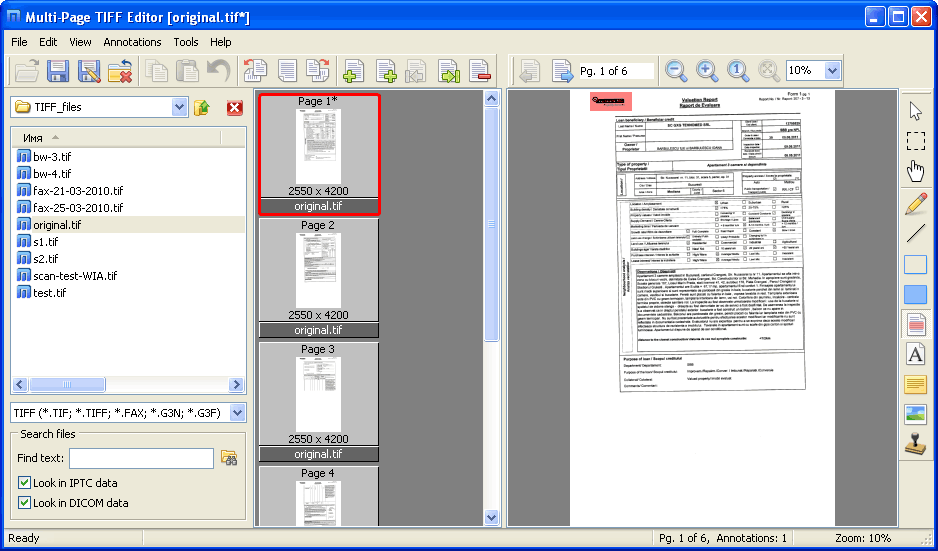
- The application allows users to view all pages of a TIFF file simultaneously in a thumbnail grid or distinct page list.
- Users can rearrange the page order, insert new pages from other files (merging documents), or extract specific pages to save as separate files (splitting documents).
- This is critical for administrative workflows where scanned documents often arrive upside down or in the wrong order; ADEO allows for instant rotation, cropping, and deskewing of individual pages.
- Beyond structural editing, the software includes annotation tools.
- Users can highlight text, redact sensitive information with black-outs, or add text stamps and notes directly onto the image.
- It also supports conversion to and from other formats like PDF, JPEG, and PNG.
- By focusing on the specific needs of document imaging, ADEO Multi-Page TIFF Editor serves as a powerful tool for law firms, medical offices, and archiving services that rely on the TIFF standard.
Technical Specifications
- Publisher: Adeoimaging.com
- License: Demo
- Operating System: Windows 7, Windows 8, Windows 10, Windows 11
- Category: Business And Productivity / Office Suite
ADEO Multi-Page TIFF Editor Screenshot