pblcompare Development Utility
4.62/5 (562 Reviews)
pblCompare is used to highlight and report on the changes made between versions of library files used for developing PowerBuilder Applications including; complete applications, groups of libraries, single objects.
Development And IT
Coding Utilities
Shareware
FREE DOWNLOAD (v2.27)
File Size: 0.62MB | Official Download
Key Features of pblcompare
- pblCompare is a tool for visual PowerBuilder Library File comparison.
- It has a number of simple and convenient features that many users have been asking for a long time from a PowerBuilder source code comparison tool.pblCompare is used to highlight and report on the changes made between versions of library files used for developing PowerBuilder Applications including; complete applications, groups of libraries, single objects.
- Use as a management tool to check all the changes to an application before a new release.
- Find out what and why the changes you just made broke the application!
- pblCompare does not modify PBL\'s in any way.
- pblCompare does not use PowerBuilder API to read PBL format.
- pblCompare supports PBL format of PowerBuilder 6 and higher.
- pblCompare may be used to compare the contents of two PowerBuilder library files or of more.
- It may be invoked using several methods depending on what you wish to do.
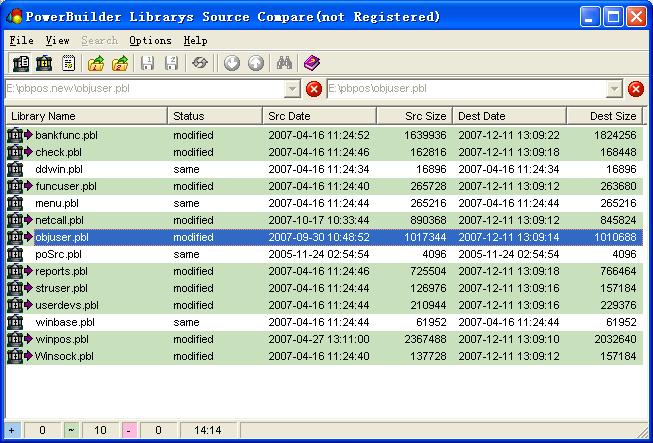
- pblCompare has three views, they are PowerBuilder library files list view, Objectsin library file list view and Object source code view.
- The default view of pblCompare is PowerBuilder library files list view.
- Files in list are opened by select the file names which extension .pbw, .pbt or .pbl.
- The Object list view list items in a PowerBuilder library file, this file would beopened from library list view or opened using Open file dialog.
- The Object source code view is split into two panes (for the object source code to be compared) with the menus and toolbar above.
- For details on opening and comparing PowerBuilder library files please
Technical Specifications
- Publisher: Pblsoft.com
- License: Shareware
- Operating System: Windows 7, Windows 8, Windows 10, Windows 11
- Category: Development And IT / Coding Utilities
pblcompare Screenshot