WizTree - High Speed MFT Disk Space Analyzer
4.02/5 (16 Reviews)
WizTree is an ultra fast disk space analyzer that scans your hard drive to reveal which files consume the most space.
System Utilities
System Optimization
Freeware
FREE DOWNLOAD (v4.22)
File Size: 7.5MB | Safe & Verified
Key Features of WizTree
- WizTree is a premier system utility designed for high performance storage analysis and advanced disk space management.
- It provides users with a lightning fast environment to scan massive hard drives by directly reading the Master File Table ensuring results are displayed almost instantly compared to traditional scanning methods.
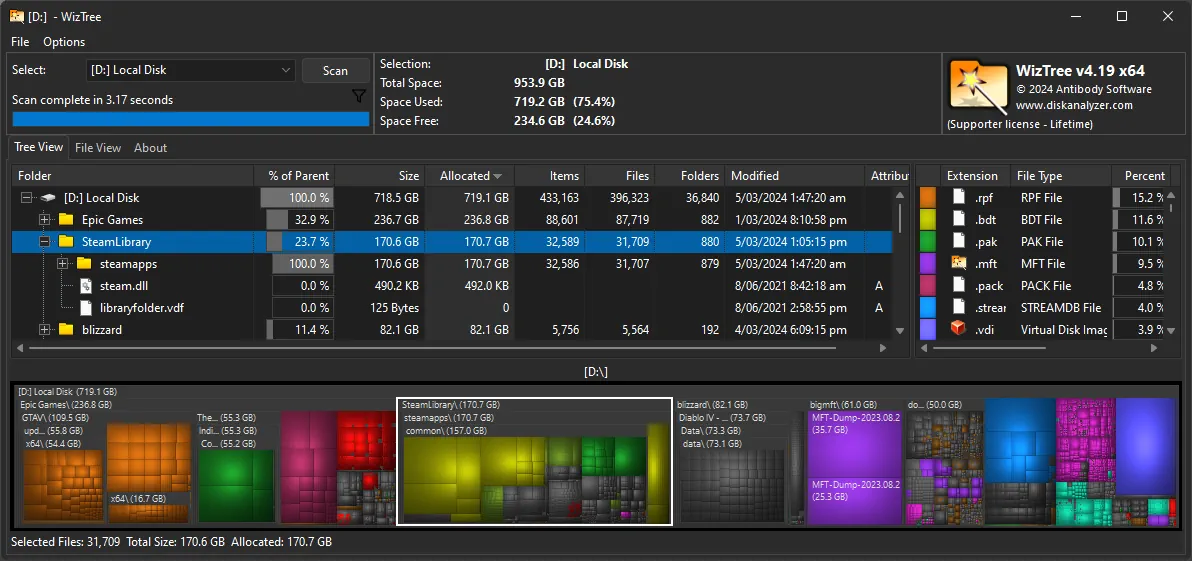
- The software features an interactive visual treemap that color codes different file types allowing users to quickly identify and delete massive data blocks without leaving the application.
- In 2026 it remains a vital tool for IT professionals and home users needing a safe and verified environment to clear out temporary files and manage network attached storage with absolute precision.
- Its support for command line exports and portable deployment makes it the globally trusted choice for incredibly fast and reliable storage optimization across all modern Windows desktop platforms.
How to find and delete large files quickly with WizTree
WizTree is a lightning-fast disk space analyzer that scans your entire hard drive to show you exactly which files and folders are eating up your storage space. Follow these steps to clean up your drive:
-
Launch as AdministratorDownload and install WizTree. For the fastest possible scan speeds, always right-click the shortcut and select Run as administrator.
-
Select Your Drive and ScanUse the drop-down menu at the top left to select the drive you want to analyze (e.g., C: Drive). Click the Scan button. The scan will typically finish in just a few seconds.
-
Analyze the Visual TreemapLook at the colorful block chart at the bottom of the screen. Each block represents a file, and the larger the block, the more space that file is taking up. You can easily spot massive files at a glance.
-
Review and Safely DeleteExpand the folders in the top "Tree View" to see exact sizes. Once you find a file you no longer need, simply Right-Click it directly in WizTree and select Delete to send it to the Recycle Bin.
Pro Tip: Looking for specific clutter? Click the File View tab at the top to see a list of every single file on your drive, automatically sorted by size from largest to smallest, making it incredibly easy to find hidden massive video or log files!
Frequently Asked Questions
WizTree bypasses standard, slow Windows API file scanning. Instead, when scanning NTFS-formatted drives, it reads the Master File Table (MFT) directly from the disk. This allows it to scan millions of files in mere seconds.
Highly recommended, but not strictly required. To access the hidden MFT and get those lightning-fast scan speeds, WizTree requires Admin rights. If you run it as a standard user, it will fall back to the traditional, slower Windows scanning method.
Yes, but proceed with caution. WizTree integrates directly with the Windows context menu, so deleting a file here is the same as deleting it in File Explorer. However, be careful not to delete critical system files located in your Windows or Program Files folders unless you know exactly what they are.
WizTree is completely free for personal use on your home computer. However, if you are using it in a commercial, enterprise, or business environment, you are required to purchase a "Supporter" license to comply with their terms of service.
Technical Specifications
- Publisher: Diskanalyzer.com
- License: Freeware
- Operating System: Windows 7, Windows 8, Windows 10, Windows 11
- Category: System Utilities / System Optimization
WizTree Screenshot