SimpleDNSCrypt - Reliable DNS Editor Utility
4.26/5 (13 Reviews)
SimpleDNSCrypt is a simple management tool to configure dnscrypt-proxy on Windows based systems.
Security And Privacy
Privacy Tools
Open Source
FREE DOWNLOAD (v0.7.0)
File Size: 8.2MB | Official Download
Key Features of SimpleDNSCrypt
- SimpleDNSCrypt is a premier open source utility designed for high performance network security and advanced DNS management.
- It provides users with a remarkably robust environment to encrypt domain name lookups with absolute precision.
- The software features an integrated proxy engine that handles secure communication between your computer and DNS providers allowing for seamless privacy protection without manual configuration.
- In 2026 it remains a vital tool for privacy advocates needing a safe and verified environment for preventing ISP tracking and man in the middle attacks across diverse hardware configurations.
- Its support for multiple resolver protocols and a highly simplified user interface ensures that every security task is handled with incredible speed and professional grade accuracy.
- SimpleDNSCrypt is the globally trusted choice for powerful and reliable DNS encryption across all modern Windows platforms.
How to secure your DNS traffic with Simple DNSCrypt
Simple DNSCrypt provides an easy-to-use interface to encrypt your DNS queries, preventing spoofing and protecting your online privacy from ISPs. Follow these steps to secure your Windows connection:
-
Install and Launch as AdministratorDownload the setup file from the official website and install it. Right-click the Simple DNSCrypt shortcut and select "Run as Administrator," as the software needs elevated permissions to modify your network settings.
-
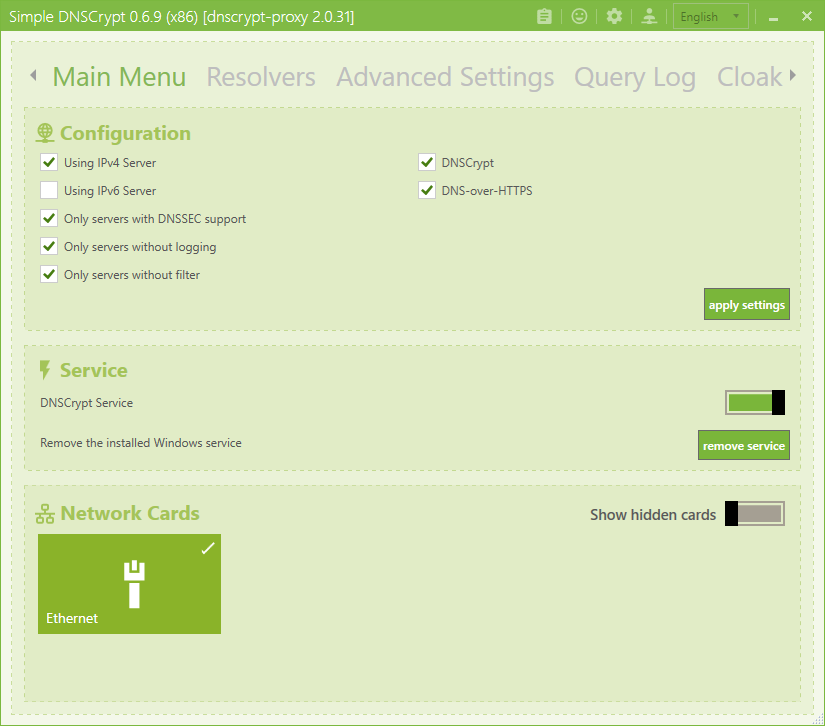
Select Your Network AdaptersNavigate to the main screen and locate the list of your network adapters. Toggle the switch next to your active connections (such as your primary Wi-Fi or Ethernet adapter) to apply the DNS protection to them.
-
Choose Your Resolvers (Optional)By default, the software will automatically pick the fastest reliable servers. If you want more control, go to the "Resolvers" tab to filter DNS servers by privacy features like "No Logs" or "DNSSEC".
-
Enable the DNSCrypt ServiceGo back to the main menu and click the primary toggle switch to turn on the DNSCrypt service. Your DNS requests are now encrypted and safe from eavesdropping!
Pro Tip: Keep "Automatic Server Selection" enabled if you are a beginner. This ensures your internet connection remains fast and stable even if a specific DNS server goes offline.
Frequently Asked Questions
Simple DNSCrypt acts as a user-friendly graphical interface for dnscrypt-proxy on Windows. Its main purpose is to encrypt your DNS traffic, preventing your Internet Service Provider (ISP) or malicious third parties on public Wi-Fi from spying on the websites you visit or intercepting your traffic.
It is mandatory. The software requires Administrator privileges because it needs to make system-level changes to your Windows network adapters. It automatically changes your default DNS settings to route traffic safely through the encrypted local proxy.
This usually happens if the specific DNS server you selected is temporarily down, or if a third-party antivirus/firewall is blocking the DNSCrypt service. To fix this, try enabling Automatic Server Selection, or temporarily toggle off Simple DNSCrypt to restore your connection while you adjust your firewall rules.
No. Simple DNSCrypt is designed exclusively for the Windows operating system. However, the core technology it uses (dnscrypt-proxy) is open-source and available for Mac, Linux, and mobile devices through other third-party interfaces or via the command line.
Technical Specifications
- Publisher: Github.com
- License: Open Source
- Operating System: Windows 7, Windows 8, Windows 10, Windows 11
- Category: Security And Privacy / Privacy Tools
SimpleDNSCrypt Screenshot