Process Hacker Professional Malware Detection Utility
Process Hacker is a free open source tool that helps you monitor system resources and detect malware.
**FREE DOWNLOAD (v2.39.124)**
File Size: 2.2MB | Safe & Verified
System Utilities
System Optimization
Open Source
Key Features of Process Hacker System Monitor
- Process Hacker System Monitor is a premier open source utility designed for high performance system auditing and advanced malware detection.
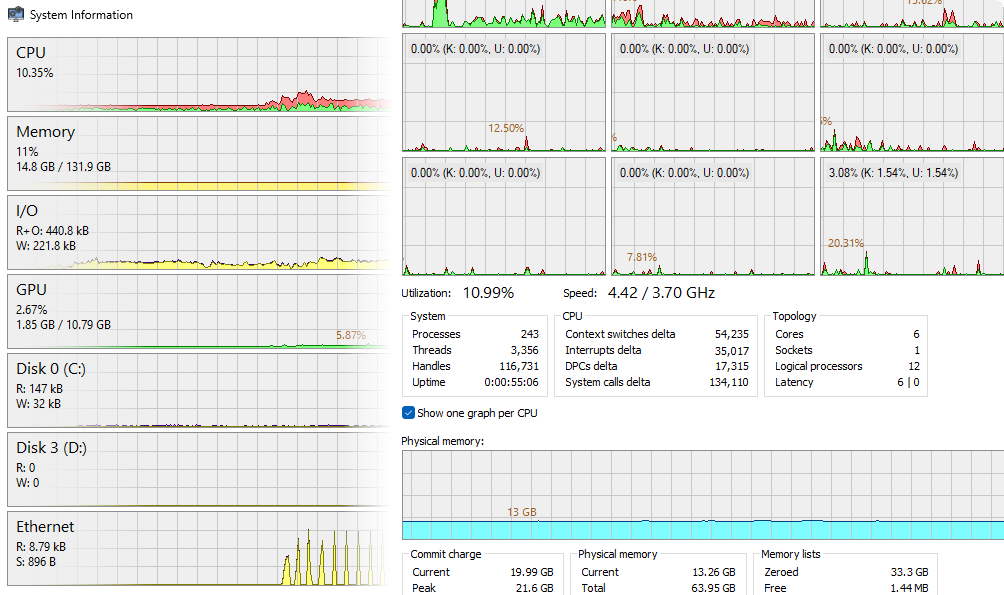
- It provides a detailed overview of all active processes, services, and network connections while offering real time graphs for CPU and RAM usage.
- The software features unique capabilities such as detaching from debuggers, viewing GDI handles, and bypassing memory locks to allow for deep level program analysis.
- In 2026, it remains a vital tool for enthusiasts and security professionals needing a safe and verified environment for troubleshooting complex software issues and identifying hidden rootkits.
- Its lightweight architecture and portable mode make it the globally trusted choice for low level system management and performance optimization across all modern Windows platforms.
How to monitor and manage Windows processes with Process Hacker
Process Hacker is a powerful, open-source tool that gives you a much deeper look at your system than the standard Task Manager. Follow these steps to start troubleshooting like a pro:
-
Launch with Administrator RightsDownload the installer or portable version and run processhacker.exe. To access advanced features like terminating protected malware or viewing kernel-level information, right-click and select Run as Administrator.
-
Identify Processes via Color CodingBrowse the main list to see your processes in a tree view. By default, Blue indicates a process running as the same user, Pink indicates a service, and Yellow indicates a "packed" or suspicious executable. This helps you spot anomalies at a glance.
-
Unlock "In-Use" FilesIf you can’t delete a file because it’s "in use," press Ctrl+F. Type the name of the file or folder in the search box. Process Hacker will show you exactly which process has a "Handle" on that file, allowing you to right-click and close it.
-
Monitor Network ConnectionsClick on the Network tab to see every active connection. You can see the local and remote IP addresses and the exact process responsible for the traffic. Right-click any entry to "Go to process" or "Terminate" the connection immediately.
Pro Tip: Hover your mouse over any process to see a detailed tooltip showing its command-line arguments, file path, and even the "Verified Signer" to ensure the file is legitimate.
Frequently Asked Questions
This is a False Positive. Because Process Hacker has the ability to terminate protected system processes, inject DLLs, and view raw memory (features also used by malware), some security software flags it as a "HackTool" or "RiskWare." It is 100% safe to use if downloaded from the official SourceForge or GitHub repository.
System Informer is the new name for the continued development of Process Hacker (specifically the 3.x branch). While Process Hacker 2.39 is the stable "classic" version, System Informer includes modern updates for Windows 11 and dark mode support.
This usually happens for two reasons: 1) You are not running Process Hacker with Administrator privileges, or 2) The process is a critical System process protected by the Windows Kernel. Ensure you launch the app by right-clicking and selecting "Run as Administrator" to bypass standard restrictions.
Yes. By looking for processes highlighted in Yellow (packed executables) or processes with no "Verified Signer" in the properties tab, you can identify suspicious software that standard Task Managers might miss. You can also right-click a process and select "Send to VirusTotal" to scan it instantly.
Technical Specifications
- Publisher: Processhacker.sourceforge.io
- License: Open Source
- Operating System: Windows 7, Windows 8, Windows 10, Windows 11
- Category: System Utilities / System Optimization
Process Hacker System Monitor Screenshot
User Rating
Based on 29 reviews.