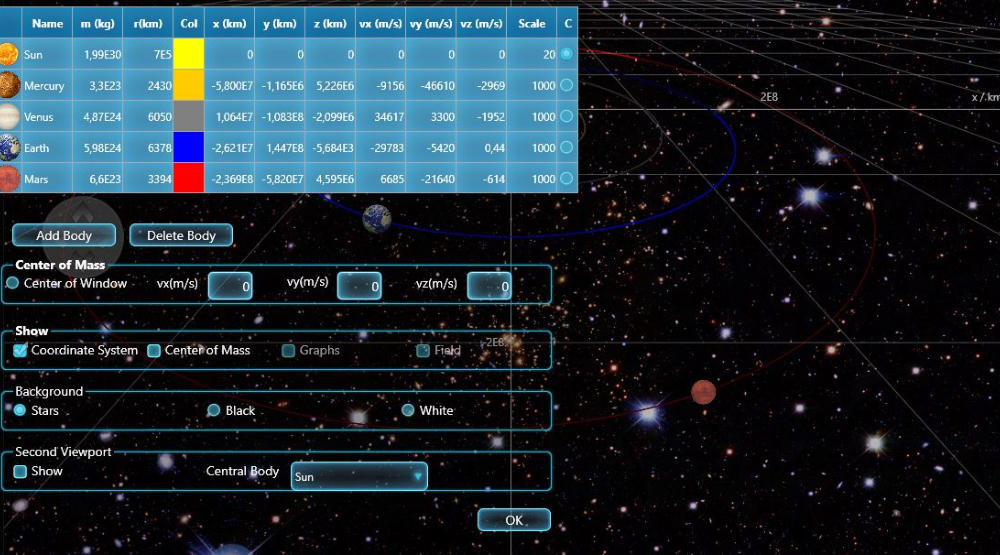
Orbit Xplorer Utility
3.84/5 (422 Reviews)
Educational orbit and gravitation simulator for high school, college and beginning university physics and astronomy.
Business And Productivity
Education And Science
Shareware
FREE DOWNLOAD (v3.11)
File Size: 3.3MB | Safe & Verified
Key Features of Orbit Xplorer
- Orbit Xplorer is an educational physics simulator that focuses on gravity and planetary motion.
- It allows students and teachers to create solar systems and simulate the orbital mechanics of planets, moons, and satellites.
- Users can adjust mass, velocity, and distance to observe how gravitational forces affect orbits in real-time.
- It is an excellent tool for visualizing Kepler\'s laws and understanding celestial mechanics.
How to run your first orbit simulation
Orbit Xplorer makes it easy to visualize complex physics problems. Follow these steps to start your first gravitational experiment:
-
Load a Premade SimulationLaunch the program and go to the File menu. Select Open to choose from over 40 included examples. We recommend starting with Satellite around the Earth or Keplers Second Law to see the basics in action.
-
Modify the ParametersClick on any planet or star to select it. You can now adjust its Mass, Radius, or initial Velocity vectors in the properties panel. Try increasing the velocity of a satellite to see if you can make it escape the gravitational pull of its planet.
-
Run the SimulationPress the Play button on the toolbar. Watch as the bodies interact according to Newtons laws of gravity. You can speed up or slow down time using the slider control to visualize long orbital periods in seconds.
-
Analyze the DataWhile the simulation runs, toggle the Graph view to plot Distance, Velocity, or Energy over time. You can also turn on Force Vectors to see the direction and magnitude of the gravitational pull on each object.
Pro Tip: Switch between 2D and 3D views to better understand complex orbits. The 3D view is especially useful for visualizing the inclination of comets or asteroids relative to the solar system plane.
Frequently Asked Questions
Orbit Xplorer offers a free demo version for download so you can test its features. The full version is paid software designed for educational institutions, teachers, and serious physics students who need complete access to all simulation tools.
The software is built for modern Windows environments. It is fully compatible with Windows 10 and Windows 11. It uses the FireMonkey framework to ensure smooth graphics performance on these platforms.
Yes. The software includes real images of planets and moons. You can simulate the inner solar system, the outer solar system, or create custom scenarios with up to 10 interacting bodies to test "what if" scenarios like a second sun or a rogue planet.
Orbit Xplorer focuses on Newtonian physics which is the standard for high school and undergraduate university courses. It simulates gravity using the inverse square law which is perfect for teaching Kepler Laws, orbital transfers, and classic celestial mechanics.
Technical Specifications
- Publisher: Ottisoft.com
- License: Shareware
- Operating System: Windows 7, Windows 8, Windows 10, Windows 11
- Category: Business And Productivity / Education And Science
Orbit Xplorer Screenshot