NirLauncher - Advanced System Conversion Software
4.18/5 (19 Reviews)
NirLauncher is a package of more than 200 portable freeware utilities for Windows.
System Utilities
System Optimization
Freeware
FREE DOWNLOAD (v1.30)
File Size: 32.5MB | Official Download
Key Features of NirLauncher
- NirLauncher is a premier freeware utility designed for high performance system diagnostics and advanced toolkit management.
- It provides users with a remarkably robust environment to access over two hundred specialized forensic and network tools with absolute precision.
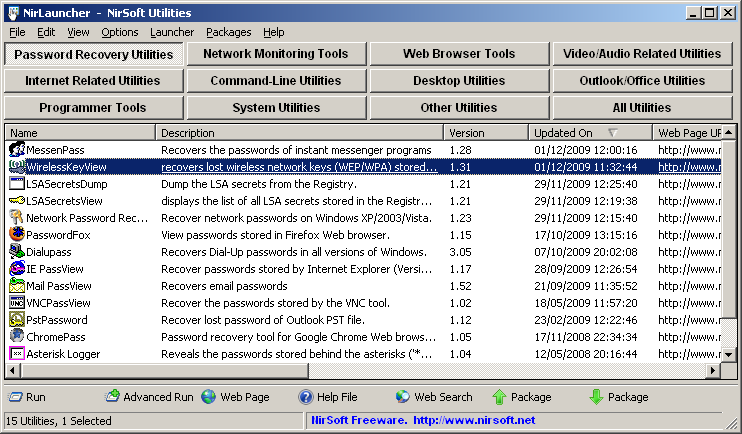
- The software features an integrated launcher interface that handles password recovery disk analysis and network monitoring allowing for seamless troubleshooting without separate installations.
- In 2026 it remains a vital tool for IT administrators needing a safe and verified environment for deep system inspection across diverse hardware configurations.
- Its support for portable execution and a highly organized utility list ensures that every maintenance task is handled with incredible speed and professional grade accuracy.
- NirLauncher is the globally trusted choice for powerful and reliable system analysis across all modern Windows platforms.
How to carry a complete IT diagnostic toolkit on a single USB drive
NirLauncher solves a massive headache for IT professionals: hunting down, downloading, and installing dozens of tiny diagnostic utilities on every PC they need to fix. This software packages over 200 incredibly powerful, portable NirSoft tools—ranging from password recovery to network monitoring—into one clean, easy-to-use interface. Follow these steps to build your ultimate portable toolkit:
-
Extract to a Portable DriveDownload the zip file from the official website. Because all the tools are 100% portable, you should extract the entire folder directly to a USB flash drive. This allows you to plug it into any broken Windows machine without installing anything.
-
Launch as AdministratorNavigate to your extracted folder and run
NirLauncher.exe. For the best results, right-click the file and select Run as Administrator. Many of the deep system and password recovery tools require elevated privileges to function correctly. -
Navigate the Utility TabsThe interface organizes over 200 tools into logical tabs, such as "Network Tools," "Password Recovery," "System Tools," and "Web Browser Tools." Click a tab, read the short description of the tool you need, and double-click it to run it instantly.
-
Integrate Additional Suites (Optional)You aren't limited to just NirSoft tools. You can download the Microsoft Sysinternals Suite, place it in the designated folder, and use NirLauncher to organize and run those tools from the exact same interface!
Pro Tip: Are you working on a modern 64-bit machine? You don't have to guess which version of a tool to run. NirLauncher automatically detects your operating system and will seamlessly launch the 64-bit version of a utility whenever it is available!
Frequently Asked Questions
This is a very common false positive. NirLauncher contains dozens of legitimate tools designed for system administrators, including utilities that recover lost Wi-Fi, browser, and email passwords. Because these tools dig deep into the Windows registry to find this information, heuristic antivirus scanners automatically flag them as "HackTools" or "Trojans." If you downloaded the file from the official NirSoft website, it is completely safe. You may need to add the NirLauncher folder to your antivirus exclusion list.
No. Every single utility included in the NirLauncher package is completely portable. They do not write any entries to the host computer's registry during installation, nor do they leave hidden files behind. You can run them straight from a USB drive and safely unplug it when you are done.
Yes. Most NirSoft utilities allow you to export the data they gather (such as a list of installed drivers, active network connections, or recovered product keys) directly to HTML, CSV, or XML files. Because the launcher is portable, any settings changes or exported logs will be saved directly into the folder on your USB drive.
Yes. All the utilities provided by NirSoft in this package are freeware. You are permitted to use them personally, as well as in professional, corporate, and IT support environments without paying licensing fees.
Technical Specifications
- Publisher: Launcher.nirsoft.net
- License: Freeware
- Operating System: Windows 7, Windows 8, Windows 10, Windows 11
- Category: System Utilities / System Optimization
NirLauncher Screenshot