MailWasher Spam Blocker
4.03/5 (244 Reviews)
MailWasher is your e-mail inbox solution, preview your email before you download it, plus delete and bounce emails back to the sender as if you didn\'t exist - great for privacy as the sender will receive an email to say the address was unknown.
Security And Privacy
Privacy Tools
Freeware
FREE DOWNLOAD (v7.15)
File Size: 28MB | Official Download
Key Features of MailWasher
- MailWasher is your e-mail inbox solution.
- Not only does it allow you to preview multiple accounts and all aspects of your emails before you download them, it also allows you to delete, and bounce emails back to the originator as if you didn\'t exist - great for privacy as the sender will receive an email to say the address was unknown – just like a returned email.
- Using this you will see a large reduction in the amount of spam and unwanted email you receive over time.
- Another feature is heuristic checking, which helps identify and mark emails as normal, virus, possibly virus, possibly spam, probably spam, chain letter, and blacklisted so you can deal with the emails as you wish.
- Other features are blacklist (which you can add to manually or automatically, and never hear from that person or spammer again), easy to use customisable filters and advanced use of regular expressions for filtering emails, use of MAPS RBL to identify spammers, multiple accounts, visual and auditory notification of new emails, heuristic checking to detect viruses and spam, minimization to system tray and much more.
- It\'s fast, free, and very sophisticated and the uncluttered interface makes it extremely simple to use.
- Comprehensive online help is available on the website.
- This is a full version with no restrictions, but donations are gladly accepted.
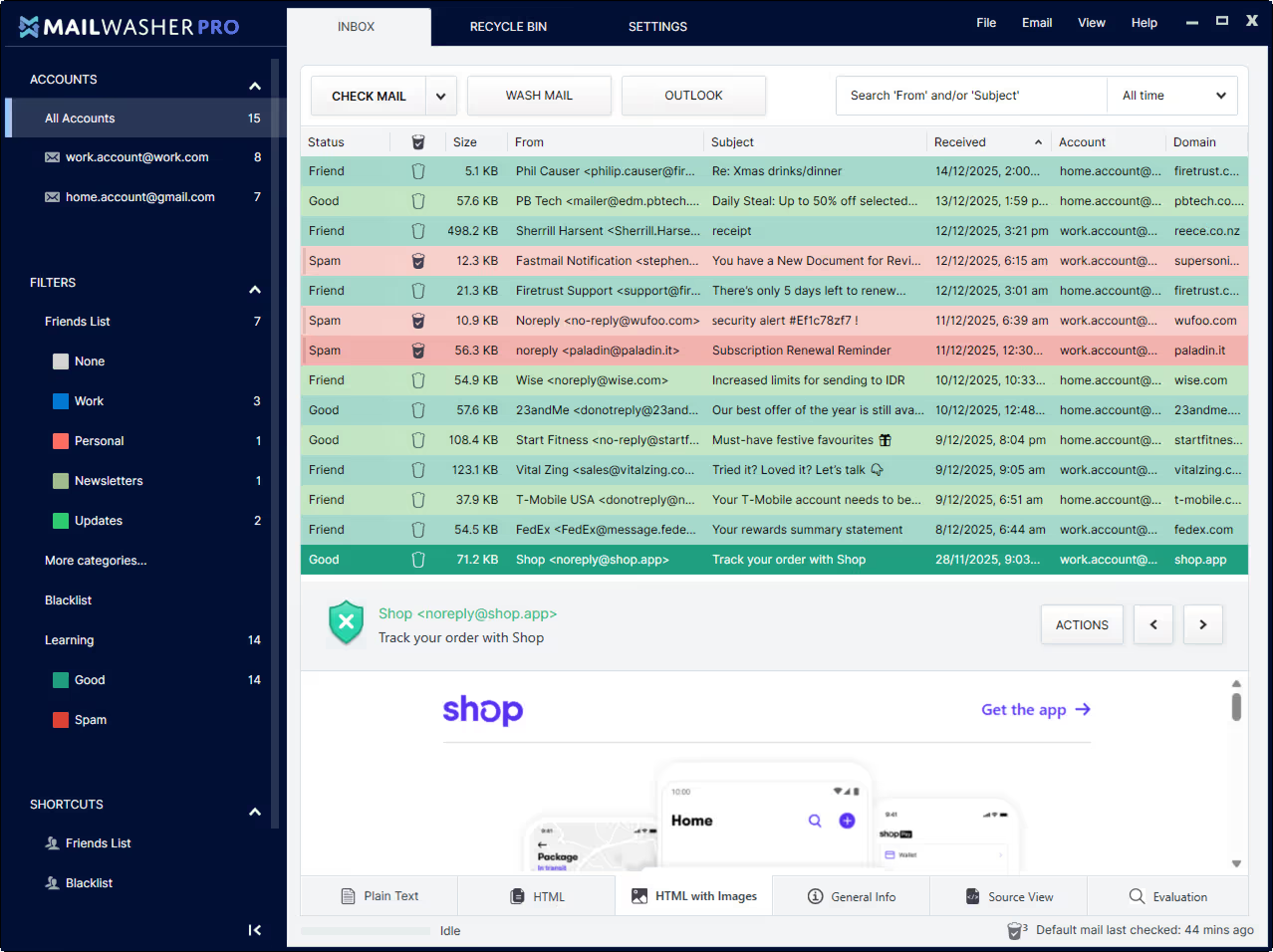
- Check out the website www.mailwasher.net if you need to know more and for a screenshot.
How to stop spam before it reaches your PC
MailWasher acts as a secure viewing station for your email. Follow these steps to keep your inbox clean and virus free:
-
Add Your Email AccountUpon first launch, MailWasher will try to import settings from your existing email software. If this fails, go to Settings, select Accounts, and click Add Email Account. Enter your email address and password. Note: Gmail and Outlook users with 2FA enabled must generate a specific App Password for this step.
-
Check for New MessagesClick the Check Mail button. MailWasher will contact the server and download headers for all new messages. It will analyze them and mark them in Green (Good) or Red (Spam) based on its learning filters and global databases.
-
Mark and WashReview the list. If you see a spam message marked as Good, click the thumbs down icon to mark it as Spam. If a friend is marked as Spam, click the thumbs up. Once satisfied, click Wash Mail. This deletes the bad emails from the server immediately.
-
Launch Your Email ProgramAfter washing, open your regular email program (like Outlook or Thunderbird). Since the junk was deleted on the server, your program will download only the safe and legitimate messages you actually want to read.
Pro Tip: To restore an accidentally deleted message, click the Recycle Bin tab. Find the message and click Restore. The tool will email the message back to you. Ensure your Outgoing SMTP settings are correct for this to work.
Frequently Asked Questions
No. MailWasher downloads only the headers and a small part of the text body to analyze spam content. This happens locally on your computer. Your private data is never sold or sent to cloud servers for human review.
Yes. MailWasher supports all major email providers including Gmail, Outlook, Yahoo, and AOL. It also supports standard POP3 and IMAP protocols for custom business email addresses.
Yes. The software includes a Recycle Bin that stores deleted messages for a set period. You can search this bin and restore any message to your inbox with a single click.
The Restore function requires a valid Outgoing SMTP server to send the recovered email back to you. If the button is inactive, go to Settings, check your Accounts, and ensure the Outgoing tab has the correct SMTP details entered for your provider.
Technical Specifications
- Publisher: Mailwasher.net
- License: Freeware
- Operating System: Windows 7, Windows 8, Windows 10, Windows 11
- Category: Security And Privacy / Privacy Tools
MailWasher Screenshot