What Does HTML to Any Converter CMD for Linux Do?

VeryPDF HTML to Any Converter Command Line for Linux is a developed application that can help your convert HTML to images (JPEG, TIFF, PNG, TGA, PS, EPS, PCX, BMP, and GIF.), PDF, PS, EPS, and Office document formats (DOC, XLS, RTF, TXT, and CSV). Feature of VeryPDF HTML to Any Converter Command Line for Linux: 1. Set password to encrypt and protect created PDF files. 2. Add page header to created PDF. 3. Option to remove hyperlinks in PDF. 4. Option to ignore JavaScript. 5. Option to disable slow JavaScript. 6. Option to convert HTML table to PDF table. 7. Option to set PDF page layouts. 8. Option to set PDF title. 9. Option to set image size, color depth and resolution. 10. Option to dither when reduce color depth. 11. Multiple options to compress TIFF image. 12. Option to set JPEG image quality. 13. Option to add end-of-line in created textual files.


Publisher: Visit HTML to Any Converter CMD for Linux 2.0 Website

Download: Download HTML to Any Converter CMD for Linux 2.0 Now

Category: Business Software > Project Management Software

Size: 30870KB

OS: Win 95/98/Me/NT/2000/XP/Vista/7

Downloads: 145157

License: Shareware

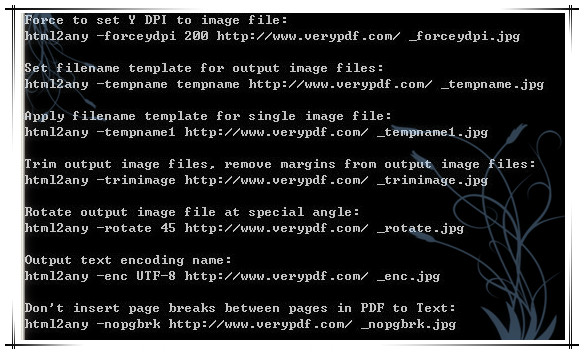
HTML to Any Converter CMD for Linux Screenshot

More Software Like HTML to Any Converter CMD for Linux 2.0

Swift To-Do List

Great and elegant to-do list software with reminder and task lists organized using unique tree structure with icons, suitable both for personal and business use. All to-do tasks can have customized priority level, it's type, due date, and reminder.

ScheduleMaster

ScheduleMaster is a multi-user appointment scheduler for multiple people, places and/or things. Create custom calendars for each resource. Import and export data. Print daily schedule for each resource and front desk calendar for the day's schedule.

Seavus Project Viewer

Seavus Project Viewer is a MS® Project viewer that allows users to open, view and print project plans (.mpp files) apart from MS® Project. Project managers create plans in MS® Project, whereas team members view those plans in Seavus Project Viewer.