FileMarker.NET Pro Utility
4.37/5 (577 Reviews)
FileMarker.
System Utilities
System Optimization
Shareware
FREE DOWNLOAD (v1.0.1)
File Size: 2488KB | Official Download
Key Features of FileMarker.NET Pro
- FileMarker.NET is a powerful, yet intuitive and easy-to-use tool that enables users to arbitrarily change separate file icon images and mark files with additional sub-icons to reflect their completeness, status, priority or type.
- Find files faster, separate your files from your co-workers` files, show document progress right on the file icon, set clearly visible priorities - it`s all possible with FileMarker.NET with just 2 mouse clicks!
How to organize your documents visually with FileMarker.NET Pro
FileMarker.NET Pro brings the real-world experience of color-coded physical folders directly to your electronic documents. Follow these 4 steps to visually organize your files:
-
Install and Ensure CompatibilityMake sure you are running Windows (7, 8, 10, or 11) and that your hard drive is NTFS-formatted. Once installed, FileMarker.NET integrates directly into your Windows system.
-
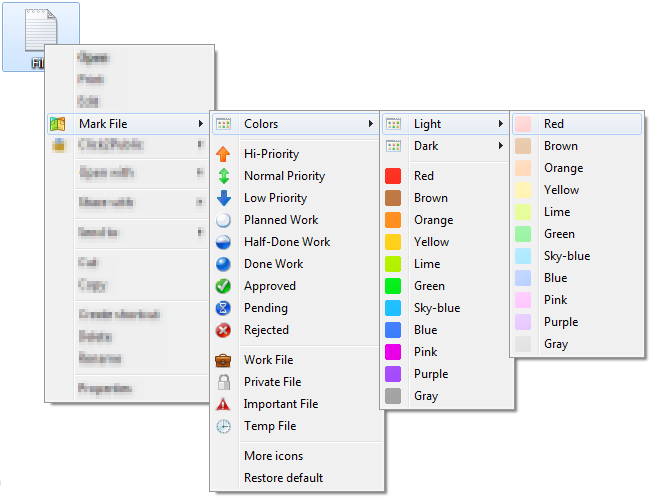
Use the Right-Click MenuYou don't even need to open the main application window to mark a file. Simply right-click on the file you want to organize, and hover over the new "Mark File" option in your popup context menu.
-
Apply Colors and Status LabelsFrom the menu, choose to color-code your file (with 33 color variations available) or apply a specific professional label. You can mark files by priority (high, normal, low), project completeness (done, half-done, planned), or status (approved, rejected, pending).
-
Combine Marks and Batch ProcessNeed to update a whole batch of documents? You can select multiple files at once and apply a combination of both a color and a label simultaneously (e.g., making a file red and marking it "urgent") to categorize your entire project instantly.
Pro Tip: Marked files catch the eye immediately, allowing you to quickly see the priority or status of a document before you even read its name or open it. This drastically improves office productivity and saves time!
Frequently Asked Questions
No. FileMarker.NET Pro integrates directly into your Windows shell. You can change file icons directly from the right-click popup menu without ever needing to launch the main program interface.
If you move or copy files with customized icons to another computer, the original appearance and custom marks will be completely preserved only if that destination system also has a copy of FileMarker.NET installed.
The software requires a Windows operating system (Windows 7, 8, 10, or 11 in either 32-bit or 64-bit editions). Additionally, your hard drive must be NTFS-formatted for the icon marking functionality to work correctly.
Yes! FileMarker.NET Pro allows you to use combinations. You can color-mark a file and simultaneously add a label to it (such as a priority marker, a letter, or a number).
FileMarker.NET Pro is licensed for both home and professional office use. It is the most fully-featured version, including 16 professional icons for office work, 36 marks with letters and numbers, 33 color variations (including dark/light states), and the ability to mark multiple files simultaneously.
Technical Specifications
- Publisher: Filemarker.net
- License: Shareware
- Operating System: Windows 7, Windows 8, Windows 10, Windows 11
- Category: System Utilities / System Optimization
FileMarker.NET Pro Screenshot