Disk Check Utility
4.39/5 (287 Reviews)
Disk Check is a free utility that can help you scan your disk drives for errors and fix them.
System Utilities
System Optimization
Freeware
FREE DOWNLOAD (v1.0)
File Size: 1433KB | Official Download
Key Features of Disk Check
- Puran Disk Check is a hard drive diagnostic utility designed to help users monitor the physical health of their storage devices.
- It serves as a user-friendly graphical interface (GUI) for the native Windows "chkdsk" (Check Disk) command, which is typically run from the command line.
- Many users are uncomfortable using text-based commands; this software makes the powerful repair capabilities of the operating system accessible via a simple point-and-click environment.
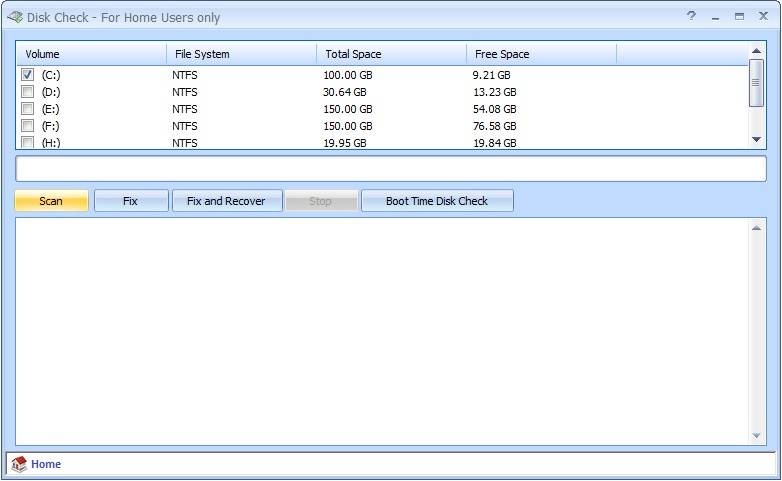
- The utility offers three primary modes of operation.
- The standard scan checks the file system for logical errors and attempts to fix broken indexes or cross-linked files.
- The "Deep Scan" or surface test goes further, reading every sector on the physical platter (or flash cell) to identify bad sectors.
- If bad sectors are found, the software can instruct the drive to mark them as unusable, preventing future data loss.
- Puran Disk Check allows users to schedule scans to run at the next system restart, which is often necessary to fix errors on the drive where Windows is installed.
- It provides a clean, detailed report after scanning, summarizing the health status of the disk.
- Regular use of this tool can help extend the lifespan of older mechanical drives by ensuring data is not written to failing areas of the disk surface.
Technical Specifications
- Publisher: Puransoftware.com
- License: Freeware
- Operating System: Windows 7, Windows 8, Windows 10, Windows 11
- Category: System Utilities / System Optimization
Disk Check Screenshot