Coolutils Mail Viewer Utility
4.01/5 (259 Reviews)
View MSG and EML files without Outlook or any other email client for free with Coolutils Mail Viewer.
Internet And Network
Communication
Freeware
FREE DOWNLOAD (v1.4)
File Size: 13.5MB | Official Download
Key Features of Coolutils Mail Viewer
- View MSG and EML files without Outlook or any other email client for free with Coolutils Mail Viewer.
- Open any email as a regular file.
- Apart from viewing, you can move, copy or delete MSG and EML files.
- Moreover, Coolutils Mail Viewer can produce a full report on your MSG/EML files.
- Create a list of senders or recepients - you choose the fields to your needs.
- Coolutils Mail Viewer is free, no annoying toolbars, no ads.
How to open MSG and EML files without Outlook
CoolUtils Mail Viewer allows you to open, view, and organize Microsoft email files without needing to install Outlook or an Exchange client. Follow these 4 steps to access your archived emails:
-
Install the Free ViewerDownload and install CoolUtils Mail Viewer. The installation is quick, 100% free for home users, and does not contain any hidden ads, toolbars, or bundled software.
-
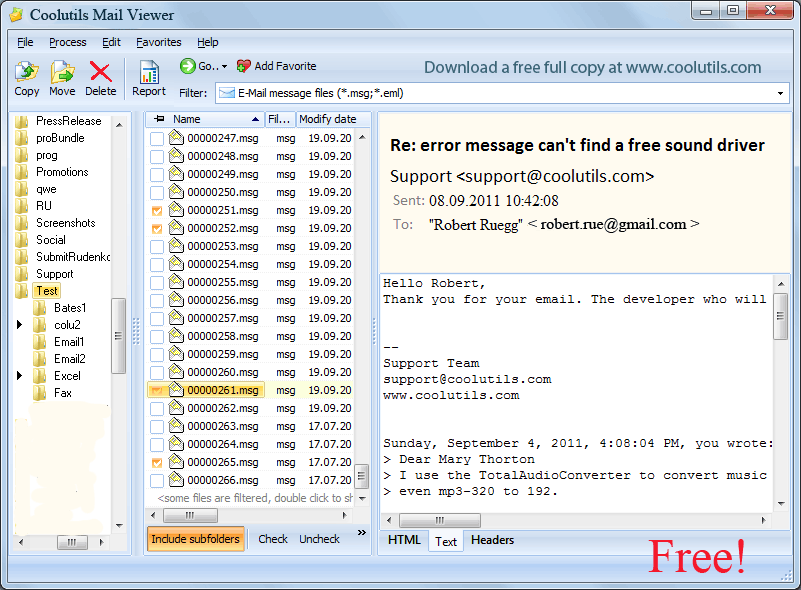
Locate Your Email FilesLaunch the program. Use the hierarchical folder tree in the left-side menu (similar to Windows Explorer) to navigate your hard drive and locate the folder containing your MSG, EML, or winmail.dat files.
-
View Messages and AttachmentsClick on any email file to instantly display its contents in the right-side viewing pane. You can read the message body, check the headers, and even preview or extract all attached documents and images directly from the interface.
-
Generate a "Fact File" ReportNeed to log your email data? Select multiple messages and click the Report button. You can generate a comprehensive analytical report of your emails in TXT, PDF, XLS, CSV, or HTML formats, customized to show only specific fields like Sender, Date, or Attachments.
Pro Tip: While viewing, you can organize your archives effortlessly. Mail Viewer includes built-in file management, allowing you to copy, move, or delete selected emails directly from the top menu without leaving the application.
Frequently Asked Questions
No. CoolUtils Mail Viewer is completely standalone. It allows you to view Microsoft email files (like MSG and winmail.dat) on any Windows PC without requiring Outlook or Exchange to be installed.
Yes, it is 100% free for home users. There are no hidden costs, trial periods, annoying ads, or bundled toolbars. However, if you intend to use the software for commercial or business purposes, a commercial license is required.
Yes. Mail Viewer provides complete attachment support. You can preview, save, and extract all types of email attachments—including documents, images, and multimedia files—directly from the viewer interface.
The free Mail Viewer allows you to generate statistical reports about your emails in PDF format. However, if you want to directly convert the actual email messages themselves into PDF or DOC files, you will need to upgrade to the separate Total Mail Converter software.
Technical Specifications
- Publisher: Coolutils.com
- License: Freeware
- Operating System: Windows 7, Windows 8, Windows 10, Windows 11
- Category: Internet And Network / Communication
Coolutils Mail Viewer Screenshot