Clipboard History Professional Utility
3.55/5 (308 Reviews)
A Windows clipboard manager with optional cloud synchronization and AES encryption.
System Utilities
Automation
Shareware
FREE DOWNLOAD (v3.40)
File Size: 3.6MB | Official Download
Key Features of Clipboard History Pro
- Clipboard History Pro is a Windows clipboard manager with optional cloud synchronization and AES encryption.
- Users can keep a repository of text items copied to the clipboard before.
- Frequently used word phrases can be added to the global paste menu.
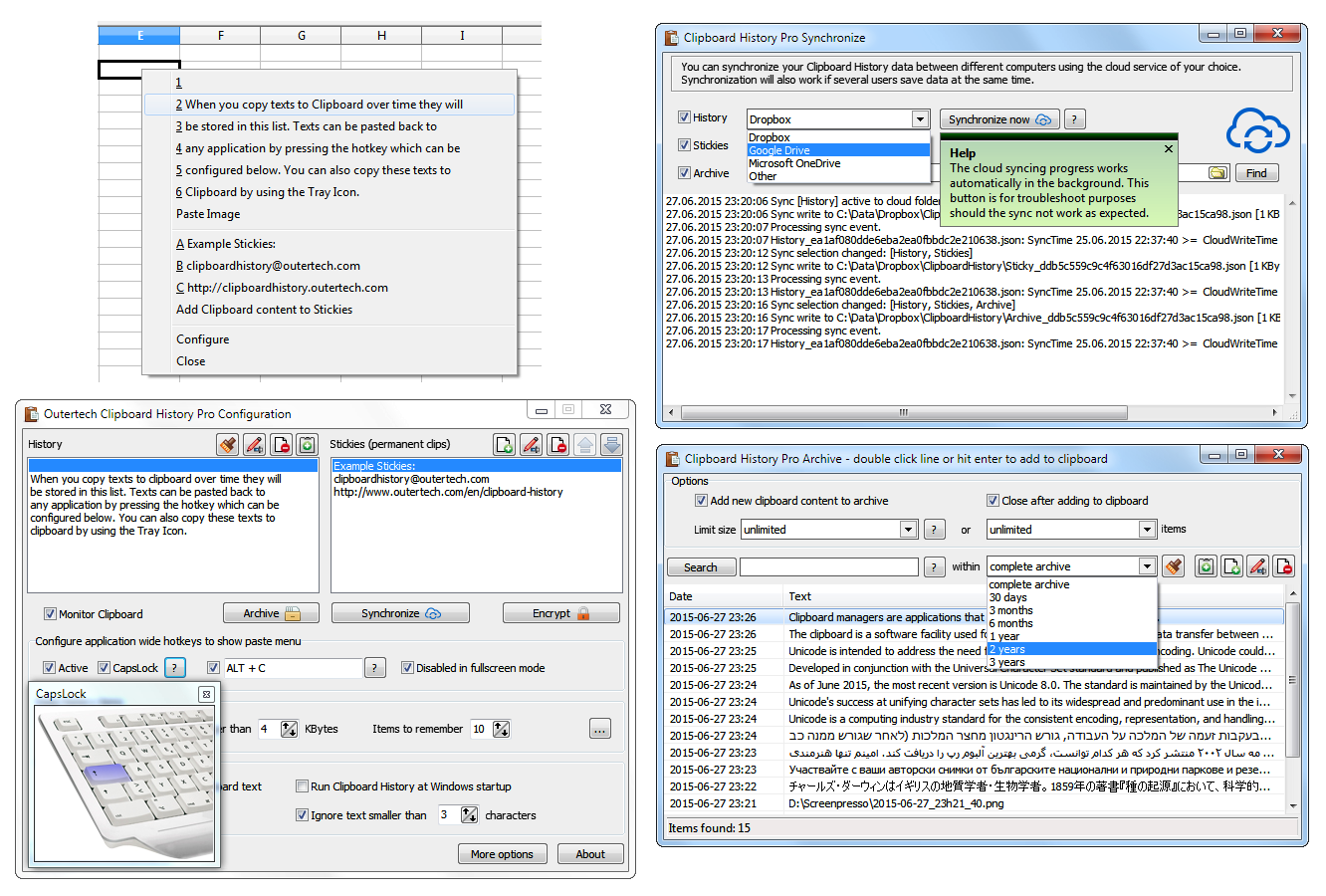
- Pressing a configurable hotkey, a tray icon, or the usually idle and useless CAPS LOCK key will bring up a paste menu of last clipboard items and saved text snippets from every Windows application.
How to never lose copied text again with Clipboard History
Clipboard History turns your usually idle Caps Lock key into a powerful tool, allowing you to access and manage everything you've previously copied. Follow these 4 steps to supercharge your copy-paste workflow:
-
Access Your Paste MenuCopy multiple items of text just like you normally would. When you are ready to paste an older item, simply press the Caps Lock key (or your custom hotkey) while in any Windows application. A menu will appear showing your recently copied items. Use your mouse or arrow keys to select and paste!
-
Create Permanent "Stickies"Do you find yourself typing the same email response, address, or code snippet repeatedly? You can save these as "Stickies". These are permanent text clips pinned directly to your paste menu that will never be overwritten by new copies.
-
Sync Across ComputersIf you use multiple PCs, you can share your clipboard across them in less than a minute. In Clipboard History Pro, select your preferred cloud service (Dropbox, Google Drive, OneDrive) and choose what data to share. Text copied on your desktop will instantly be available to paste on your laptop.
-
Search Your Permanent ArchiveClipboard History Pro stores every text you've ever copied into a highly secure JSON database. Open the Archive to search through millions of past records. You can even use operators (like searching
"invoice -paid") to find exactly what you copied weeks or months ago.
Pro Tip: Have you ever received a long web link in an email that broke into two lines, making it unclickable? Just highlight the broken lines and copy them. Clipboard History will automatically join the multi-line text into a single, working URL ready to be pasted into your browser.
Frequently Asked Questions
By default, Clipboard History takes over the Caps Lock key because it is usually idle and conveniently located. However, you can still toggle standard Caps Lock functionality by holding the Shift key while pressing Caps Lock. Alternatively, you can change the trigger to a different custom hotkey or just use the system tray icon.
Clipboard History Lite is completely free (even for commercial use) and saves up to 20 recent clipboard items and 20 stickies. Clipboard History Pro allows for an unlimited history archive, cloud synchronization between computers, AES data encryption, Rich Text Format (RTF) support, and advanced search features.
Yes. Clipboard History Pro includes optional AES Encryption. This means you can encrypt all of your copied data and stickies before it is synced through third-party cloud services like Dropbox or Google Drive, ensuring nobody else can read your sensitive clippings.
The Lite version supports standard Western/Latin languages. If you need full Unicode support for all global languages, including special characters and symbols, you will need to use Clipboard History Pro.
Yes! Clipboard History includes a filtering feature. You can set specific rules to ignore certain text formats or keywords, ensuring that unwanted or sensitive items (like passwords from a password manager) aren't permanently archived in your history list.
Technical Specifications
- Publisher: Outertech.com
- License: Shareware
- Operating System: Windows 7, Windows 8, Windows 10, Windows 11
- Category: System Utilities / Automation
Clipboard History Pro Screenshot