BleachBit Professional Secure Privacy and Disk Utility
4.54/5 (10 Reviews)
BleachBit is a free open source system cleaner that quickly frees disk space and guards your privacy.
System Utilities
System Optimization
Open Source
FREE DOWNLOAD (v5.1.0)
File Size: 15.6MB | Safe & Verified
Key Features of BleachBit System Cleaner
- BleachBit System Cleaner is a premier open source utility designed for high performance disk maintenance and advanced privacy protection.
- It features a surgical approach to data erasure, allowing users to delete junk files, clear internet history, and shred temporary logs without impacting the core operating system.
- The software includes specialized cleaners for over a thousand applications, including browser database vacuuming to improve speed and responsiveness.
- In 2026, it remains a vital tool for privacy conscious users needing a safe and verified environment to permanently erase sensitive data and recover gigabytes of storage space.
- Its transparent code and absence of adware or telemetry make it a trusted choice for secure file shredding and system optimization across all Windows and Linux platforms globally.
How to clean your system and free disk space with BleachBit
BleachBit allows you to quickly free up disk space and guard your privacy by securely erasing cache, cookies, and hidden temporary files. Follow these steps to get started:
-
Launch the SoftwareDownload the open-source setup for Windows or Linux and install it. Open the BleachBit application (Run as Administrator for deep system cleaning) to begin.
-
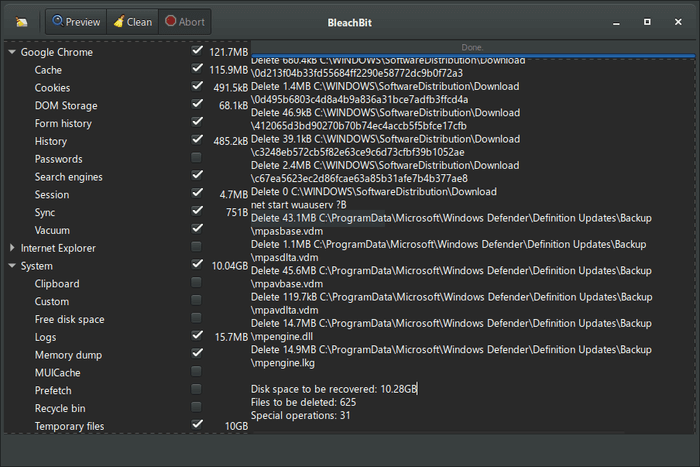
Select Items to CleanOn the left panel, check the boxes next to the applications or system areas you want to clean, such as Google Chrome cookies, System Logs, or Windows Explorer temporary files.
-
Preview Your SavingsClick the Preview button at the top. The tool will scan your system and display a detailed list of exactly which files will be deleted and how much total disk space you will recover.
-
Clean and ShredOnce you are satisfied with the preview, click the Clean button. BleachBit will permanently erase the selected junk files. You can also use the File menu to shred specific files or wipe free disk space.
Pro Tip: Beyond simple deletion, use the "Wipe Free Space" feature to securely overwrite traces of files that were previously deleted by other applications, ensuring they can never be recovered!
Frequently Asked Questions
Sometimes. You can run BleachBit normally to clean your own personal browser history and user files. However, if you want to clean deep system files, clear out system-wide caches, or wipe free disk space, you will need to right-click the shortcut and select "Run as Administrator."
No. Unlike simply sending a file to the Recycle Bin, BleachBit is designed to protect your privacy. It utilizes advanced file shredding techniques to overwrite the data, making it virtually impossible for data recovery software to restore your sensitive files.
Exercise caution. While BleachBit is safe, checking every box might delete saved passwords, browser preferences, or active login sessions. It is highly recommended to read the short description provided for each option and use the Preview button before hitting Clean.
Currently, BleachBit is specifically built and optimized for Windows and Linux operating systems. Mac users will need to utilize a different system cleaning utility designed for macOS.
Technical Specifications
- Publisher: Bleachbit.org
- License: Open Source
- Operating System: Windows 7, Windows 8, Windows 10, Windows 11
- Category: System Utilities / System Optimization
BleachBit System Cleaner Screenshot