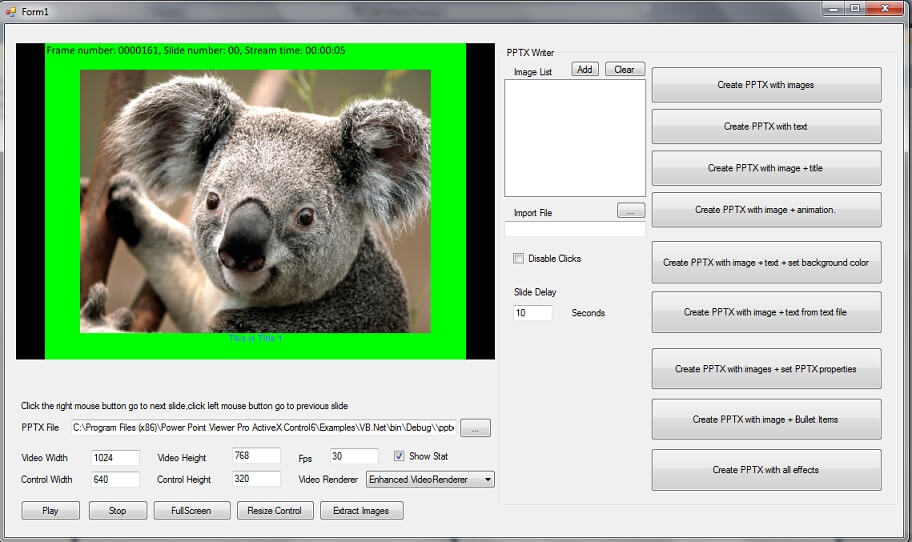
Viscom PowerPoint Viewer Pro SDK Component
4.35/5 (573 Reviews)
Support display PPTX file ,PPTX creation without installed MS Powerpoint or MS Powerpoint Viewer.
Development And IT
Languages And Scripts
Shareware
FREE DOWNLOAD (v1.0)
File Size: 7.72MB | Official Download
Key Features of VISCOM Power Point Viewer Pro SDK
- Support display PPTX file ,PPTX creation without installed MS Powerpoint or MS Powerpoint Viewer.
- Support user define video resolution, frame rate and the display area when displaying PPTX file.
- Support display full screen when displaying PPTX.
- Support use Video Renderer 7, Video Renderer 9, Enhanced VIdeo Renderer(for Window 7 or 8 only) when displaying PPTX file.
- Support Add image to specific slide when create the PPTX file.
- Support Add text to specific slide when create the PPTX file.
- Support Add title text to specific slide when create the PPTX file.
- Support Add animation effect to specific slide when create the PPTX file.
- (The animation effect only display when you open PPTX file on MS Powerpoint or MS Powerpoint Viewer) Support Set background color to specific slide when create the PPTX file.
- Support Add text from text file to specific slide when create the PPTX file.
- Support Set Title, Author, Subject, Keyword, Category, Status, Remark properties when create the PPTX file.
- Support Add bullet text to specific slide when create the PPTX file.
Technical Specifications
- Publisher: Viscomsoft.com
- License: Shareware
- Operating System: Windows 7, Windows 8, Windows 10, Windows 11
- Category: Development And IT / Languages And Scripts
VISCOM Power Point Viewer Pro SDK Screenshot